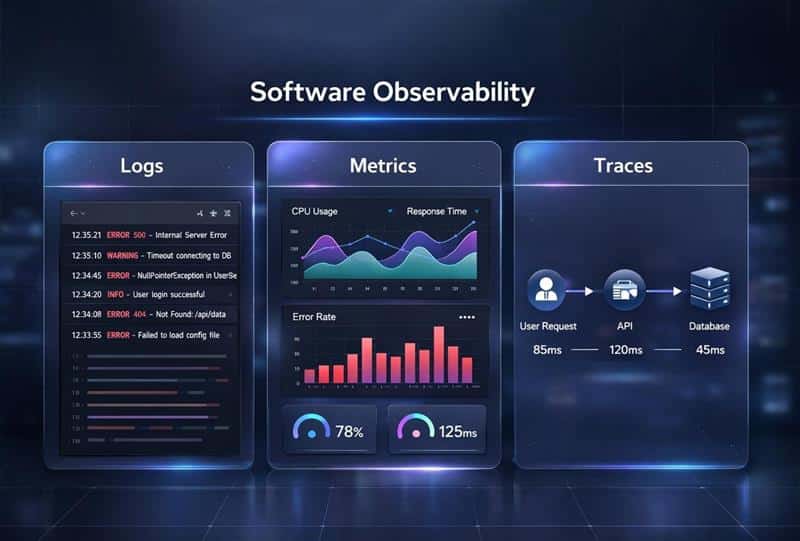
Software observability delivers strong returns. Many teams report a 4x ROI after adopting modern observability platforms. High-growth SaaS companies that run distributed systems need deep visibility into system behavior and system performance. Modern software systems produce massive telemetry data every second. Logs metrics and traces flow from multiple services, infrastructure components, and cloud native applications. Observability tools provide a way to collect data, analyze data, and understand system health in real time.
Modern observability goes beyond traditional monitoring tools. It helps development teams correlate data across cloud infrastructure, serverless functions, and distributed tracing pipelines. Observability platforms provide analysis capabilities that turn operational data into actionable insights. Teams can detect performance bottlenecks, analyze log data, and complete root cause analysis faster. Strong observability solutions improve system reliability, support digital transformation, and strengthen application performance across complex cloud native environments.
What Is Software Observability
Software observability helps teams understand what happens inside modern software systems. It focuses on collecting and analyzing telemetry data such as logs, metrics and traces. Observability tools provide deep visibility into system behavior, system health, and application performance. Instead of only tracking surface-level performance metrics like CPU usage, teams analyze data across distributed systems and multiple services. Observability data reveals how a user request moves through complex systems in cloud computing environments.
Modern observability goes beyond traditional monitoring tools. Observability platforms provide analysis capabilities that help development teams correlate data from infrastructure components, cloud native applications, and serverless functions. By analyzing observability data, software engineers can detect performance bottlenecks and complete root cause analysis faster. Strong observability solutions improve system reliability and support the full software development lifecycle in complex cloud native environments.
Observability vs. Traditional Monitoring
Modern software systems run on distributed systems, cloud native applications, and multiple services. Many teams still rely on traditional monitoring tools. Monitoring tracks system health, but software observability goes deeper. It explains system behavior and reveals hidden risks inside complex systems, which is crucial when designing scalable, secure SaaS architectures.
Scope Of Data Collection
Traditional monitoring focuses on predefined performance metrics. Teams track CPU usage, memory, uptime, and error rates. Monitoring presumes you already know what might go wrong.
Software observability collects broader telemetry data. Observability tools gather logs metrics and traces across infrastructure components and cloud infrastructure. Observability platforms provide a unified observability platform that correlates operational data. Teams can analyze data beyond preset dashboards.
Known Unknowns Vs Unknown Unknowns
Monitoring can only track known unknowns. Teams define alerts in advance and wait for system events. That approach worked well for legacy systems.
Distributed systems create unpredictable behavior. Observability enables teams to explore unknown unknowns. Engineers analyze log data and distributed tracing paths without predefined assumptions. Complex system behavior becomes easier to understand in cloud native environments.
Causes Of The Problems
Traditional monitoring provided adequate visibility into legacy infrastructures. It shows what failed but struggles to explain why a problem exists. Alerts often lack context.
Software observability supports deep root cause analysis. Observability data connects user request paths with application performance. Teams correlate data across system components. Analysis capabilities help explain performance regressions, outages, and even security threats.
Depth Of Exploration
Monitoring typically checks system health through preset dashboards. It focuses on surface-level signals. Application performance monitoring tools often stop at thresholds.
Observability takes monitoring to the next level of insight. Observability platforms provide context across logs and traces, performance data, and user behavior. Splunk reports that organizations with mature observability resolve incidents 2.5 times faster. Deeper exploration improves system reliability and application performance management.
Role In Modern DevOps
Monitoring supports alerts and basic performance monitoring. It remains useful and does not disappear. Observability does not replace monitoring tools. It expands their value.
Observability empowers engineering teams and DevOps teams to manage complex environments. Modern observability improves digital transformation outcomes and cloud migration success for growing teams. Gartner notes that over 70% of enterprises now prioritize observability solutions for cloud native systems. Strong observability software strengthens the entire software development lifecycle.
Observability Vs Traditional Monitoring Comparison Table
Criteria
Traditional Monitoring
Software Observability
Primary Focus
Tracks predefined performance metrics such as CPU usage, memory, uptime
Examines overall system behavior across complex systems
Data Scope
Collects preset data points
Collects broad telemetry data including logs metrics and traces
Visibility Level
Surface-level system health checks
Deep visibility into distributed systems and multiple services
Problem Detection
Identifies known unknowns based on configured alerts
Detects unknown unknowns through analyzing observability data
Root Cause Analysis
Limited context, often requires manual investigation
Supports faster root cause analysis with correlated data
Architecture Fit
Works well for legacy systems
Designed for cloud native environments and distributed tracing
Data Correlation
Siloed monitoring tools with limited cross-system correlation
Unified observability platform that correlates operational data
Exploration Capability
Relies on predefined dashboards
Enables flexible exploration of logs and traces and performance data
DevOps Impact
Supports basic performance monitoring
Empowers engineering teams to optimize system reliability
Business Context
Focuses on infrastructure-level signals
Connects application performance with user behavior and business impact
How Observability Solves Critical SaaS Performance Issues
Observability platforms change how teams handle performance challenges. The data collected through logs, metrics and traces helps engineering teams diagnose issues faster and prevent problems before users notice them, which is essential for executing SaaS scalability strategies for sustainable growth.
Fast Root Cause Analysis
Root cause analysis identifies the mechanisms of problems rather than addressing symptoms. Observability software accelerates this process through unified data correlation. Organizations that adopt observability see up to 54% reduction in mean time to resolution.
Related data streamlines troubleshooting. An API that experiences latency spikes can be analyzed with observability tools that relate logs, metrics and traces to pinpoint whether a specific microservice, database query or third-party integration caused the slowdown. This eliminates guesswork by exposing interactions between components and dependencies that might otherwise go unnoticed.
Distributed systems present unique challenges for root cause analysis. A payment processing failure might stem from a timeout in a downstream inventory service. Observability data reveals these connections by visualizing the transaction path in full. Teams can isolate faulty components instead of manually searching through disconnected logs.
Proactive Issue Detection
Proactive monitoring keeps up with trends by looking for early indicators. Observability tools help teams detect and resolve performance problems before they affect customers. Organizations with complete observability practices see 64% fewer incidents that could potentially affect users.
Establishing performance baselines based on historical data is foundational. Baselines provide a reference point for labeling data points as anomalies or observing trends. Patterns of subpar or worsening response times found through monitoring almost always indicate serious problems once baselines exist.
End-To-End Request Visibility
Distributed tracing tracks requests as they move through distributed systems. This capability provides insights into system interactions across multiple services and applications. Teams can determine which services are involved in achieving requests and measure how long each service takes to handle its part.
End-to-end tracing monitors request status from initiation through completion. The tracing platform creates a unique trace ID and tracks the request through frontend to backend when a user submits a form. Each step generates a span representing a single unit of work, such as an API call or database query.
Key Benefits Of Software Observability
High-performance teams adopt observability software for measurable business outcomes. 58% of organizations receive $5 million or more in total value from their observability investment each year. Teams report a median return on investment of 295%. Every dollar spent returns four dollars of value.
Low Mean Time To Resolution
Observability platforms cut incident resolution times. Organizations with complete observability practices reduce mean time to resolution by up to 54%. This acceleration comes from autonomous reasoning, correlation and actioning capabilities that compress investigation timelines from hours to minutes.
Traditional incident investigation relies on manual log analysis and tribal knowledge. Observability tools automate routine diagnostics so engineering teams focus on software development instead of endless troubleshooting. Site reliability engineers query logs, get into visualizations and relate traces to find root causes faster.
Better System Reliability And Uptime
System uptime affects revenue and customer trust. Research shows 46% of organizations report that observability improved system uptime and reliability. Live visibility shifts operations from reactive firefighting to proactive prevention and minimizes downtime.
The financial stakes are substantial. Unplanned downtime costs reach $5,600 to $9,000 per minute across industries. Every grounded aircraft hour costs airlines between $10,000 and $15,000, not including hotel vouchers, rebooking expenses and customer attrition. Companies with optimized mean time to resolution cut downtime costs by up to 30%.
Analytical Decision Making
Observability data informs strategic business decisions beyond technical troubleshooting. Teams gain specific details to optimize investments and understand fluctuations of digital business performance in real time. Tracking user behavior helps organizations identify functionalities that users access most and areas where users encounter issues.
Predictive analytics use historical data and machine learning algorithms to forecast future trends. Organizations anticipate resource needs during peak periods and avoid overages while maintaining budget discipline. This capability transforms approaches from reactive responses to proactive strengthening, especially when supported by dedicated predictive analytics software platforms.
Optimized Resource Use
Observability tools uncover inefficiencies in resource usage through granular insights into CPU, memory and GPU consumption. These insights inform strategic workload placement and dynamic resource allocation in a cloud-first SaaS development model. Atlassian reduced metrics data costs by 10% using Splunk's metrics pipeline management capabilities.
Teams identify overprovisioned resources and underutilized assets that waste compute power or storage. Observability platforms help DevOps and business teams combine disparate tools and improve cost efficiency with capacity planning. Organizations automate scaling policies to allocate resources during peak hours and reduce allocation afterward. This avoids overprovisioning.
Essential Observability Tools And Platform Capabilities
Observability platforms that work integrate multiple capabilities and provide unified visibility across distributed systems. These platforms collect telemetry data from infrastructure components, applications and user interactions.
Infrastructure Monitoring Features
Infrastructure monitoring tools track performance and health across servers, containers, databases and cloud resources. Agent-based collection installs lightweight software on hosts and gathers detailed metrics about CPU usage, memory utilization, network bandwidth and disk space. These agents find components on their own and capture data at one-second intervals without sampling.
Agentless monitoring relies on built-in protocols like SNMP and SSH and collects system data without additional software installation. Cloud-native support proves critical for modern systems. Platforms integrate with third-party cloud providers and track ephemeral resources as they scale on their own.
Tagged infrastructure metrics apply metadata like operating system, service name or availability zone to backend components. These tags let teams total metrics across infrastructure and identify specific areas experiencing issues. Machine learning capabilities analyze historical performance and detect anomalies on their own.
Distributed Tracing Capabilities
Distributed tracing tracks requests as they flow through multiple services in microservices architectures. Each activity generates a span with timestamps and metadata. These spans assemble into complete traces that show the full request timeline.
OpenTelemetry provides industry-standard instrumentation for vendor-neutral trace collection. Auto-instrumentation libraries enable zero-code setup for popular languages and frameworks. Service maps visualize dependencies between components. Flame graphs display parent and child spans and reveal bottlenecks.
Log Management And Analysis
Log management tools collect, process and analyze log data from applications and systems. Ingestion handles both structured JSON and unstructured text formats in real time. Advanced search and filtering capabilities let teams query logs fast and find relevant information.
Centralized platforms total logs from multiple sources into unified views. Parsing extracts meaningful patterns from large volumes of log data on its own. Customizable dashboards provide visualizations that help teams monitor key metrics and reduce manual work.
Real-User Monitoring Integration
Real-user monitoring captures actual user interactions with web browsers and mobile applications. The technology tracks client-side performance metrics that include Time to First Byte, page load times and JavaScript errors, which directly influence UX-driven churn reduction and retention.
RUM agents are framework-agnostic and work with any frontend application. They measure user behavior, screen load times and platform-specific issues like Android ANR events. Integration with distributed tracing connects frontend experiences to backend service performance, complementing specialized UI/UX design services for SaaS products.
Best Practices For Implementing Observability Software
Modern software systems grow fast. Distributed systems, cloud native applications, and multiple services create complex environments. Software observability becomes a critical capability in this setup. A clear strategy helps development teams improve system reliability, detect performance bottlenecks, and maintain strong application performance across the software delivery lifecycle.
Define Clear Observability Goals
Every observability strategy needs direction. Engineering teams must define what system behavior they want to measure. Focus on key performance indicators such as latency, error rate, throughput, and CPU usage. These performance metrics connect directly to system health and user behavior.
Research from Google’s DORA reports shows elite teams deploy 973 times more frequently than low performers. Clear goals help correlate data with business outcomes. Observability tools provide better results when teams align observability data with system reliability and user request performance.
Collect High Quality Telemetry Data
Software observability depends on telemetry data. Modern systems generate logs metrics and traces across infrastructure components and cloud infrastructure. Data collection must stay consistent across multiple services and distributed systems.
Observability platforms provide structured pipelines for metrics logs and traces. Poor data quality leads to weak root cause analysis. Gartner reports that poor data quality costs organizations an average of $12.9 million per year. Strong telemetry data types improve actionable insights and performance data accuracy.
Unify Logs Metrics And Traces
Siloed monitoring tools slow teams down. Observability solutions must unify logs and traces with metrics logs and traces in one unified observability platform. Distributed tracing connects system events across cloud native environments.
Observability platforms provide correlation across operational data. Teams can analyze log data alongside performance monitoring signals. According to Splunk’s State of Observability report, 83% of organizations say unified observability reduces mean time to resolution. Faster analysis capabilities improve system performance and reduce unknown unknowns.
Integrate Observability Early In Development
Software observability should start inside the software development lifecycle. Development teams must integrate observability into continuous integration pipelines and cloud migration strategies. Early visibility improves application performance management.
McKinsey reports that organizations with mature observability reduce downtime costs by up to 50%. Observability tools provide early feedback during software development. Engineers detect performance bottlenecks before release. Strong integration supports digital transformation and software modernization for legacy systems and strengthens system components across complex cloud native applications.
Use Automation And Predictive Analytics
Modern observability platforms use machine learning algorithms to analyze data at scale. Predictive analytics helps detect security threats and performance issues before users notice them, especially when combined with broader AI-driven automation in SaaS platforms. Control theory concepts also support automated system reliability improvements, especially when combined with consistent SaaS design systems for scalable products.
Gartner predicts that by 2027, 40% of organizations will adopt AI-driven observability solutions. Observability platforms provide proactive alerts based on telemetry data and system events. Engineering teams gain faster root cause analysis and stronger application performance without manual effort.
Focus On Business Impact And User Experience
Observability data must connect to user interface performance and user behavior. A slow user request directly affects revenue. Amazon once reported that every 100ms delay in page load time reduced sales by 1%. System performance matters.
Observability tools provide visibility into application performance across cloud native environments and serverless functions. Teams can correlate data between system components and customer experience metrics. Strong observability software supports system reliability, protects revenue, and strengthens long-term digital transformation goals.
Common Problems Of Software Observability
Software observability delivers strong value, yet many organizations struggle during implementation. Modern systems generate massive telemetry data across distributed systems and cloud native environments. Complex technology stacks add friction. Many organizations also depend on rigid off-the-shelf tools where custom software can transform operations. A strategic shift beyond traditional monitoring becomes necessary for long-term success.
Alert Fatigue And Noise
Observability tools can flood teams with alerts. Alert storms often hide critical system events. Gartner reports that over 30% of outages escalate due to missed alerts. Static thresholds increase noise in complex systems.
Solutions:
Base alerts on SLOs instead of static thresholds
Use AIOps and machine learning to detect anomalies
Prioritize alerts tied to user request and system reliability
Data Volume And Cost Control
Modern software systems produce huge volumes of logs metrics and traces. Observability data grows fast in cloud computing environments. High data collection costs reduce ROI. Controlling telemetry data types becomes difficult at scale.
Solutions:
Implement intelligent sampling for distributed tracing
Apply strict data retention policies
Track performance metrics that link to business value
Complex Technology Stacks
Distributed systems span multiple services, cloud infrastructure, and serverless functions. Engineering teams struggle to correlate data across system components. Observability platforms provide visibility, but integration across modern systems requires planning.
Solutions:
Deploy a unified observability platform
Standardize telemetry data formats across infrastructure components
Host the observability stack separate from production systems
Manual Instrumentation Gaps
Some frameworks and legacy code lack native observability support. Manual instrumentation increases effort during software development. Software engineers must modify code to collect data and capture system behavior.
Solutions:
Prioritize auto-instrumentation where possible
Document telemetry standards inside the software development lifecycle
Focus manual instrumentation on high-risk complex systems
Slow Insight From Raw Data
Raw operational data alone does not create value. Laborious analysis of logs and traces delays root cause analysis. McKinsey notes that poor observability maturity can increase downtime costs by up to 40%.
Solutions:
Use observability platforms with strong analysis capabilities
Correlate performance data with user behavior
Leverage predictive analytics for faster actionable insights
Software observability requires more than new monitoring tools. A strategic shift toward active introspection across cloud native environments helps teams unlock real value from observability solutions.
How GainHQ Strengthens Software Observability For Modern SaaS Teams
Modern SaaS teams manage distributed systems across cloud infrastructure and multiple services. Software observability becomes critical in such complex environments. GainHQ helps engineering teams gain better visibility into system behavior and system performance. It supports structured data collection across workflows and infrastructure components. Teams can track key performance metrics and monitor system health without relying only on traditional monitoring tools.
Observability tools provide deeper insight when connected to business workflows. GainHQ improves how teams analyze data across the software development lifecycle. Clear operational data helps detect performance bottlenecks and improve system reliability. The same disciplined approach that helped a SaaS startup launch an MVP in 90 days applies when embedding observability from day one, especially when teams follow a structured guide to building a minimum viable product in software development. With better visibility into application performance and user request flows, teams strengthen cloud native environments and build more resilient modern software systems.
FAQs
Can Software Observability Reduce Cloud Infrastructure Costs?
Yes. Software observability helps teams analyze data across cloud infrastructure and detect unused resources. Clear visibility into telemetry data, CPU usage, and performance metrics supports smarter scaling decisions and prevents overprovisioning in cloud native environments.
Is Software Observability Necessary For Small SaaS Startups?
Yes. Even small teams run distributed systems and multiple services. Observability tools provide early insight into system behavior and application performance, which protects system reliability during rapid growth and cloud migration.
Does Software Observability Improve Security And Compliance Monitoring?
Yes. Observability platforms provide deeper visibility into system events and operational data. Teams can correlate logs, metrics and traces to detect unusual user behavior and potential security threats across infrastructure components.
Can Observability Platforms Work With Hybrid Or Multi Cloud Environments?
Yes. Modern observability solutions collect telemetry data types from multi-cloud infrastructure and cloud native applications. A unified observability platform helps engineering teams maintain consistent system health across complex environments.
How Does Software Observability Support Continuous Integration Pipelines?
Software observability connects performance data with the software development lifecycle. Development teams gain real-time insight into system performance during releases. Faster feedback improves application performance management and reduces production risks.
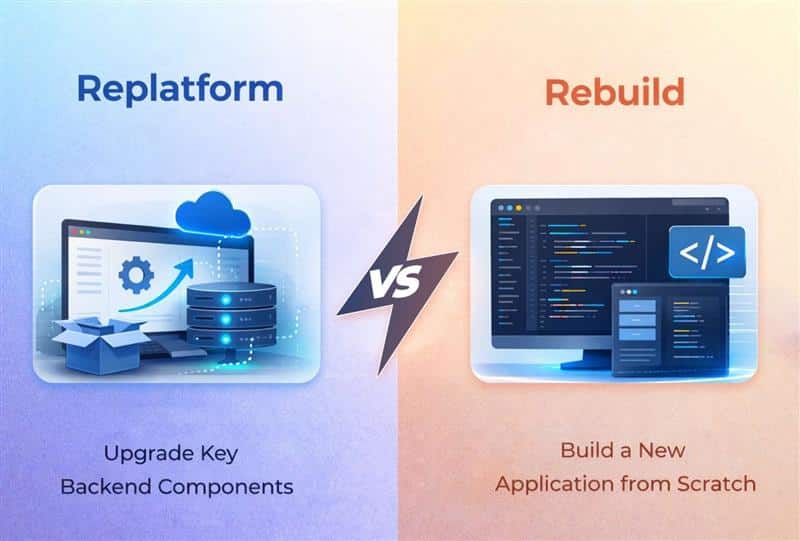
Replatform vs rebuild decisions shape how businesses prepare their technology for long term platform growth. Many organizations operate on outdated platforms that struggle to meet today's demands for speed, scalability, and reliability. As systems age, companies must decide whether to make minimal changes through replatforming or invest in completely rebuilding their applications for a fresh start.
Choosing the right path often depends on resources, risk tolerance, and strategic priorities. A new platform can unlock modern capabilities, improve performance, and reduce long term maintenance challenges. However, rebuilding an application completely can be resource intensive and requires careful planning to avoid costly delays. When approached strategically, both options help businesses cut costs over time, strengthen operational stability, and create a foundation that supports future innovation and growth.
Why Teams Struggle With Replatform Vs Rebuild Decisions
Teams often face friction when choosing between replatform and rebuild. Each path affects delivery speed, risk, and scalability. Unclear priorities, technical debt, and uncertain outcomes in the cloud environment make decisions harder.
Lack Of Clear Cloud Migration Strategy
Many teams begin cloud migration without a defined cloud migration strategy. That gap leads to confusion about whether to replatform or rebuild. A weak plan also limits how teams use cloud capabilities on a cloud platform. Without clarity, decisions become reactive instead of structured, which slows progress and increases risk across the cloud environment.
Complexity Of Legacy Systems
Legacy systems carry years of logic, integrations, and dependencies. Moving them into a cloud environment is not straightforward. Teams hesitate because cloud computing models often conflict with older architectures. Replatforming may keep the system running, but it may not fully align with modern expectations. Rebuilding seems cleaner, yet the cost and uncertainty hold teams back.
Uncertainty Around Cloud Capabilities
Many teams do not fully understand cloud capabilities before making decisions. A cloud platform offers scalability, but not every system benefits equally. Cloud native features can improve performance, yet they require architectural changes. Without clarity, teams struggle to evaluate if replatforming can meet needs or if rebuilding is required to unlock full value.
Challenges In Managing Infrastructure
A shift to a new cloud environment brings operational pressure. Teams must redesign cloud infrastructure, security, and deployment models. Even with a managed cloud service, gaps in experience can delay progress. Cloud based platforms simplify some aspects, but they still demand changes in how systems are managed and maintained.
Trade Off Between Speed And Long Term Value
Replatforming allows faster adoption of cloud computing with fewer changes. It helps teams move into a cloud environment quickly. However, rebuilding often delivers better alignment with cloud native features and long-term scalability, especially when you compare refactor vs rebuild approaches for complex systems. Teams struggle to balance immediate delivery needs with the benefits of a modern cloud infrastructure, which keeps the decision unresolved.
What Replatforming Means In Practice
Replatforming means moving an application to a new cloud platform with limited changes to its core architecture. Teams shift workloads from legacy systems into a modern cloud environment while keeping existing code largely intact, which makes smooth cloud migration planning essential to avoid disruption. The focus stays on improving performance, scalability, and resource utilization without a full rebuild.
In practice, teams adjust configurations, update dependencies, and optimize parts of the system to align with cloud capabilities. They may adopt managed services, improve deployment pipelines, and enhance reliability. Replatforming often acts as a middle path in cloud migration, where businesses gain benefits from cloud computing while avoiding the cost and risk of rebuilding from scratch.
Replatforming focuses on moving applications with targeted improvements instead of full redesign. Teams aim to modernize systems within a structured cloud environment while balancing speed, cost, and long-term scalability outcomes as part of a broader software modernization strategy.
Alignment With Cloud Platform And Services
Replatforming aligns applications with a modern cloud platform while leveraging cloud services for better scalability. Teams shift workloads into a refined cloud environment and often prepare for a new cloud platform when needed. This approach ensures systems can operate efficiently while adapting to evolving infrastructure demands without major disruption.
Optimization Without Full Code Rewrite
A core trait involves working with existing code instead of rebuilding from scratch. Teams ensure compatibility with the new environment while addressing regulatory or compliance requirements. In some cases, platforms like Salesforce Commerce Cloud are integrated to extend capabilities or complemented with custom software development services to cover unique needs. The goal is to achieve better performance while minimizing development effort and risk.
Structured Transition And Data Handling
Replatforming follows a defined replatforming process supported by strong it infrastructure. Teams plan data migration carefully to avoid inconsistencies and ensure continuity. Legacy applications and existing infrastructure are adapted to fit into a modern setup. This structured approach reduces errors and keeps operations stable during the transition.
Adoption Of Modern Infrastructure Elements
Teams enhance systems by introducing serverless computing and upgrading to new infrastructure. This shift allows better scalability and flexibility without changing core logic. A well-managed transition helps systems take advantage of modern resources while maintaining stability. Replatforming creates a bridge between traditional systems and advanced cloud setups.
Focus On Security And System Integration
Security becomes a key focus during replatforming. Teams implement security features and identity management to protect data and access. Existing systems are integrated into the new setup, ensuring consistency across the it environment. Core systems are maintained while improving reliability,
When Replatforming Is The Better Move
Replatforming fits situations where systems need improvement without full replacement. It allows teams to enhance performance and scalability inside the existing it environment while keeping risk and disruption under control.
Stable Systems That Need Gradual Improvement
Replatforming works best when core systems are reliable but require modernization. Instead of rebuilding, teams enhance existing systems and introduce new features step by step. This approach keeps operations stable while allowing steady evolution without major disruption.
Transition From Legacy Hosting Models
Organizations moving from on premises applications often choose replatforming to reduce complexity. It allows systems to shift into modern setups without rewriting everything. With added support like load balancing, applications can handle higher demand and improved reliability without structural overhaul.
Need For Better Performance And Flexibility
When systems struggle with scaling or responsiveness, replatforming offers a practical solution. Enhancing digital infrastructure and refining business operations helps improve efficiency. Teams can upgrade platform features and align systems with a current platform while gradually moving toward modern platforms, similar to how custom software transformed companies that outgrew generic tools.
Improving Control And System Efficiency
Replatforming is ideal when teams need stronger control over access and operations. Introducing access controls improves governance without affecting usability. It also helps refine how systems interact with other business elements, ensuring smoother coordination across the current system while maintaining stability.
How To Keep Replatforming Costs Under Control
Keeping replatforming costs under control requires disciplined planning and clear priorities. Start by auditing workloads to identify what truly needs change and avoid unnecessary upgrades. Focus on high-impact improvements that deliver measurable value.
Use a phased approach instead of moving everything at once. This reduces risk and spreads costs over time. Optimize resource allocation to improve efficiency and prevent overspending on infrastructure. Leveraging managed services or tech consulting services that help modern businesses grow can also lower operational overhead and maintenance effort.
Set clear budgets and track expenses throughout the process. Monitor performance after each phase to ensure expected outcomes. Avoid overengineering by keeping changes minimal and aligned with business goals. A structured approach helps control costs while still achieving modernization benefits.
What Rebuilding Really Involves
Rebuilding involves redesigning an application from the ground up to fit modern architecture and business needs. Teams replace outdated components, restructure workflows, and develop new systems aligned with current technology standards.
Unlike incremental updates, rebuilding requires rewriting core logic, redefining data models, and creating new integrations. It often includes adopting scalable architectures, improving performance, and aligning systems with evolving requirements. This process demands significant time, resources, and coordination across teams, which is why choosing the right custom software development partner becomes critical.
Rebuilding also introduces opportunities to eliminate technical debt and improve long-term flexibility. However, it carries higher risk compared to replatforming, as errors or delays can impact operations. A well-planned approach ensures the new system delivers better reliability, scalability, and future readiness.
Key Characteristics Of Rebuilding
Rebuilding replaces an existing system with a fully redesigned solution. It focuses on long-term scalability, flexibility, and alignment with evolving needs, while addressing limitations of the current platform and outdated architectures and often revisiting earlier custom vs off-the-shelf software decisions.
Full Replacement Of Current System
Rebuilding removes dependence on the current system and current platform. Teams design solutions from scratch to fit modern platforms without constraints from legacy setups. This approach allows better alignment with platform features and ensures systems can evolve without limitations tied to older architectures or other business elements.
Strong Security And Control Foundation
Security becomes a core element during rebuilding. Teams implement enhanced security and define access controls from the beginning. This ensures systems are protected while maintaining proper governance. A strong foundation helps manage risks and improves how systems interact across digital infrastructure and critical environments.
Alignment With Business Operations
Rebuilding enables systems to directly support business operations. Instead of adapting workflows, teams design systems that match real processes. This improves efficiency and coordination across other business elements. With better integration into digital infrastructure, organizations gain more control and flexibility in how systems operate.
Investment And Long Term Value
Rebuilding requires higher initial cost but offers long-term cost savings. It eliminates inefficiencies tied to outdated systems and reduces recurring fixes. By moving fully to modern platforms, organizations gain flexibility and scalability. This investment supports future growth while ensuring the system remains aligned with evolving needs and performance expectations.
When A Full Rebuild Is Worth It
A full rebuild makes sense when outdated infrastructure limits growth and stability. Systems tied to on premises infrastructure often struggle to scale, integrate, or meet modern expectations. In such cases, re architecting delivers long-term cost savings and unlocks application benefits that incremental changes cannot provide, similar to how a structured build vs buy software decision clarifies long-term trade-offs.
Rebuilding becomes critical when key risks like data loss, security gaps, or compliance certifications are involved. Teams can ensure compatibility with modern standards while creating a controlled staging environment for testing and clarifying how different software services models affect security and compliance. This reduces failure points and improves reliability.
A rebuild also enables continuous integration and supports flexible platforms that adapt to changing business elements. Platforms like Microsoft Azure integrate well with identity systems such as Active Directory, improving control and scalability and pairing well with decisions around no code vs custom development for different modules.
While a replatforming strategy may offer partial benefits, a rebuild helps organizations gain full advantage of modern architecture and performance.
Replatform Vs Rebuild: Side By Side Comparison
You need to compare both options on the dimensions that matter most: speed, cost, risk, and impact on customers. This side by side view helps you make an informed decision.
Dimension
Replatform
Rebuild
Time To First Value
2 to 4 months
6 to 12 months
Total Project Duration
3 to 9 months
12 to 24 months
Impact On Existing Users
Minimal disruption
Requires adaptation period
Change To User Experience
Improve performance, same flows
Complete redesign possible
Long Term Flexibility
Limited by existing architecture
Unlimited, cloud native
Upfront Investment
40 to 60% of rebuild cost
Full rebuild investment
Technical Debt Resolution
Partially addressed
Completely eliminated
Risk Level
Moderate
Higher
Rebuilding takes longer and costs more upfront. It offers a clean slate for major product evolution and technical flexibility. New revenue streams become possible. Cloud based features and modern architectures unlock new capabilities.
Many teams overestimate the need to rebuild when a well planned replatform plus targeted refactoring can cover 70 to 80 percent of their current pain. A hybrid software modernization approach that mixes replatforming, refactoring, and selective rebuilding often delivers the best business value.
A Practical Framework To Decide Between Replatform And Rebuild
Here is a simple, repeatable checklist your product team can use in a week or two of workshops. This framework helps you move from uncertainty to clarity.
Stage 1: Assess Where You Are
Evaluate your current state with honest metrics. Look at uptime over the past 12 months. Check average response times and how they have trended. Count incident frequency and severity. Track infrastructure cost trends since at least 2021.
Identify how many features are blocked by the existing architecture. List integrations that cannot be implemented without major changes. Document security gaps and compliance issues. This assessment grounds your decision in reality rather than assumptions.
Stage 2: Clarify Where You Need To Be
Consider planned features for the next 3 to 5 years. Advanced reporting. AI assisted workflows. Mobile apps. Real time collaboration. Can your current stack support them without massive hacks, and does your SaaS product roadmap reflect the technical work required?
Think about business goals beyond features. Cost reduction. Entering new markets. Scaling to 10x your current users. Supporting enterprise customers with strict requirements. Your legacy modernization strategy must align with where the business is headed.
Stage 3: Score Replatform Vs Rebuild
Rate each option from 1 to 5 on four dimensions: business risk, technical feasibility, budget fit, and time to impact. Involve both technical and non-technical stakeholders in the scoring, and consider case studies where software build vs buy decisions shaped the modernization path.
A replatform might score high on budget fit and time to impact but lower on long term flexibility. A rebuild might score high on flexibility but lower on budget fit and speed. The scores create a framework for discussion rather than a definitive answer.
Stage 4: Plan For Hybrid Options
Consider hybrid paths. Replatform first in 2025 to stabilize the foundation. Schedule a targeted rebuild of specific modules like billing or analytics in 2026 to 2027. This phased approach balances risk tolerance with available resources.
Many successful modernization projects combine strategies. Some modules get replatformed. Critical components get rebuilt. The portfolio approach maximizes business value while managing investment efficiently.
How GainHQ Guides Businesses Through Replatform Vs Rebuild Decisions
The team at GainHQ has seen many SaaS products and internal tools struggle with the same replatform versus rebuild dilemma, regularly sharing lessons on their GainHQ blog about software modernization and cloud migration. The challenge rarely has an obvious answer. Context matters enormously.
GainHQ typically starts with a discovery process. The team reviews architecture diagrams. They look at production metrics and current website performance data. They run interviews with product owners, support teams, and a small group of users. This research reveals pain points that surface level analysis misses and feeds into broader technology consulting services recommendations.
The focus stays on connecting technical options to clear business outcomes. Reducing onboarding time. Cutting error rates in support operations. Unlocking new revenue streams. Enabling cloud adoption that supports growth. Every recommendation ties back to what matters for the business.
GainHQ can help plan phased modernization. The team designs replatforming roadmaps that control costs and reduce risk. They structure rebuilds to protect revenue while the new system gets constructed. Both paths benefit from experienced guidance through the migration process.
Think of GainHQ not as a one-off vendor but as a long term partner. The relationship extends from the first infrastructure move to continuous improvement of workflows and customer experience, similar to how ongoing technology consulting services for modern businesses ensure continuous alignment. Whether you need to replatform or rebuild, the goal remains the same: delivering cost effective solutions that serve your customers and grow your business.
Frequently Asked Questions
Is Replatforming Just “Lift And Shift” To The Cloud?
Pure lift and shift usually means copying the application from one environment to another with almost no changes. Replatforming goes further. It includes targeted optimizations like adopting managed databases, adding autoscaling capabilities, and improving deployment pipelines. Replatforming aims for genuine cloud benefits like reliability, observability, and operational efficiency. The goal is not just moving servers from one data center to another. It is transforming how your application runs to improve performance and reduce maintenance costs.
Can We Replatform Now And Rebuild Later?
Many teams follow this exact path. They replatform first to stabilize costs and reliability over 6 to 12 months. Then they plan a deeper rebuild of critical modules once they have more data and budget. Framing replatforming as buying time makes sense. It reduces risk while your organization learns more about long term product direction. You can use the stabilization period to validate assumptions about what a future rebuild should include.
How Do We Avoid Disrupting Current Customers?
Both strategies can be implemented with careful change management. Feature flags help control rollout. Beta programs let you gather feedback before broad release. Staged rollouts by region or customer segment limit blast radius. Transparent communication about maintenance windows builds trust. Early involvement of support teams and account managers helps catch customer concerns before they turn into churn. The goal is progress without surprising your users.
What Skills Does Our Team Need For Replatforming Or Rebuilding?
Replatforming requires strong DevOps, cloud architecture, and database migration skills. Teams need experience with infrastructure as code, container orchestration, and cloud native services. Rebuilding demands additional capabilities. UX design. Product discovery. Modern application architecture experience. The scope is broader because you are creating something new rather than moving something existing. Be honest about in-house capabilities. A partner like GainHQ can fill gaps in planning, implementation, or change management when internal resources are limited.
How Should We Measure Success After Modernizing?
Track clear metrics that connect to business value. Reduction in hosting and maintenance costs. Improved uptime percentages. Faster page loads and site speed. Quicker release cycles. Customer satisfaction scores and churn metrics that reflect how UX changes affect retention, as described in the role of UX in reducing SaaS churn. Measure these outcomes at three and six months after go-live. Compare results against the original business case. This comparison reveals whether replatforming or rebuilding delivered the expected value and helps guide future decisions.
Research shows that poor planning contributes heavily to project failures. A realistic software development timeline protects your project from costly delays and budget overruns. In fact, studies confirm that projects with detailed planning phases deliver higher on-time success rates by a lot.
Your software development timeline can range from a few months to over a year, depending on project complexity and scope. We understand that navigating the software development life cycle phases requires strategic planning and clear milestones.
In this article, we will walk you through each software development phase, compare software development methodologies, and provide realistic timeline expectations to revolutionize your development process from backlog to production reality.
What Is A Software Development Timeline
A software development timeline outlines all the tasks and key phases of a software development project. It maps the entire development process from the initial stage to the maintenance phase. The software development timeline defines the analysis phase, design phase, development phase, testing phase, and deployment. It sets realistic expectations, aligns project goals, and helps track progress across the entire project. A typical software development timeline depends on project scope, project complexity, and software development methodology such as agile methodologies or rapid application development.
A development timeline supports project planning, resource allocation, and risk management. The project manager coordinates development teams, software developers, and agile teams to meet project requirements. Each project phase includes unit testing, integration testing, system testing, performance testing, security testing, and user acceptance testing. Regular code reviews, detailed documentation, and technical documentation protect software quality and software's reliability. User research, market research, user feedback, and data migration ensure software aligns with existing systems and customer satisfaction. Rigorous testing and bug fixes support successful completion and high-quality software running smoothly.
Software Development Life Cycle Phases Overview
The software development life cycle phases give structure to your software development timeline. Knowing each phase helps you estimate realistic timelines and allocate resources for your development project.
Planning And Requirements Analysis
The first stage sets the foundation for your development process. Your project team gathers requirements from stakeholders, customers and end users to understand what the software needs to accomplish. Senior engineers and project managers conduct feasibility studies that cover technical, operational and economic aspects.
You create the Software Requirement Specification (SRS) document at this phase. This document acts as the blueprint for all subsequent development activities. Research shows that 39% of software projects fail due to poor requirements gathering and management. Fixing requirement errors costs 5-10 times more during development than during analysis. Production fixes can cost 50-100 times more.
Your team defines project scope, establishes timelines and allocates resources. Business analysts conduct stakeholder interviews, document analysis and use case development. The planning phase takes up 15-25% of your total project budget.
Design And Architecture
Your team transforms requirements into technical specifications once they are finalized. System architects create both High-Level Design (HLD) and Low-Level Design (LLD) documents. The HLD defines overall system architecture, database design and relationships between modules. The LLD covers individual component logic, API interfaces and database tables.
Your design phase addresses critical decisions about future-proof technology stack selection, component identification and integration strategy. Teams create wireframes, data flow diagrams and user interfaces to map out system functionality. UI/UX design makes the software easy-to-use and meets user expectations.
Development And Coding
This is the longest phase where actual building takes place. Developers write code based on the Design Document and follow coding standards and best practices. Your development teams use IDEs, compilers and version control systems like Git to manage code.
Key activities include coding, code reviews, unit testing and static code analysis. Regular code reviews help identify potential issues early and verify adherence to standards. Your team breaks down the project into smaller, manageable coding tasks that can be completed daily.
The output of this phase is functional software that embodies the planning, analyzing and designing efforts from earlier stages.
Testing And Quality Assurance
Quality assurance plays a critical role in any software development lifecycle. The International Software Testing Qualifications Board defines quality assurance as activities focused on providing confidence that quality requirements will be fulfilled. Testing involves executing programs to identify defects and verify that software behaves as expected.
Practice shows that software errors detected late become expensive to fix, as the cost of an error increases throughout the software development process. Testing early and often through iterative approaches proves beneficial. Automated testing boosts efficiency and increases test coverage while providing immediate feedback on code changes. It's also an important factor for development cost as well.
Deployment To Production
Your software moves to the production environment where end users can access it after rigorous testing. The deployment phase includes packaging, environment configuration and installation. Your team sets up production environments and conducts smoke testing on the live environment.
Deployment strategies vary based on project needs. Options include Big Bang, Blue-Green or Canary deployments. Your deployment process requires monitoring changes as they roll out live to users. Teams can initiate a rollback to remove changes and revert to the last known safe version when errors occur in production.
DevOps engineers and release managers handle deployment activities and minimize downtime while optimizing performance for a satisfying user experience.
Maintenance And Support
The software development life cycle doesn't end at deployment. Maintenance begins right after deployment and continues throughout the software's operational lifetime. Studies reveal that 75% of a system's lifespan cost is occupied by maintenance. Some sources indicate maintenance can cost up to two-thirds of the software process cycle.
Maintenance covers corrective, preventative, perfective and adaptive activities. Corrective maintenance addresses faults and errors. Preventative maintenance looks into the future to keep software working as long as possible. Any software becomes obsolete over time without maintenance.
Typical Software Development Timeline Breakdown
Project complexity determines how long your software development timeline will extend. Breaking down timelines by application type provides realistic expectations for project planning and resource allocation.
Simple Applications Timeline
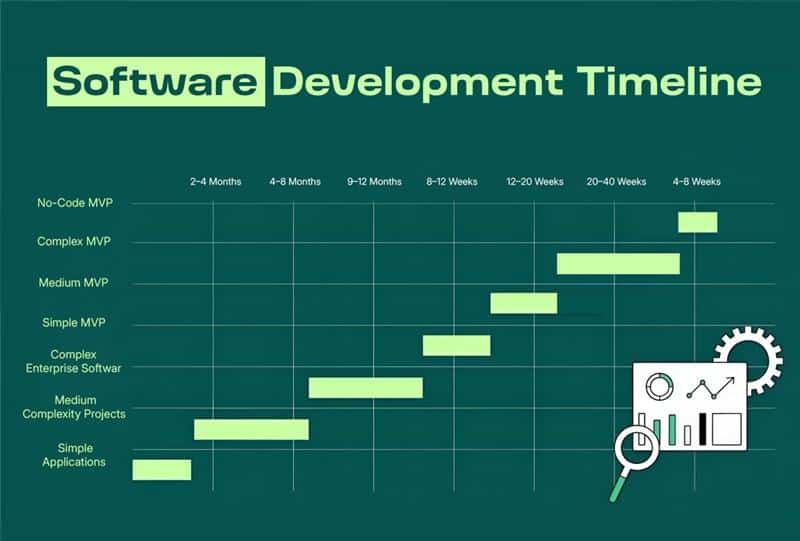
Simple applications require 2-4 months from start to finish. These projects have basic utility tools, single-purpose applications, or straightforward mobile apps with limited screens and minimal backend requirements.
Your requirements and design phase consumes 2-4 weeks. This original stage has understanding your idea, creating wireframes, and getting stakeholder approval. Development follows with backend API creation taking 5-10 weeks and frontend work requiring another 4 weeks. Integration testing and bug fixes occupy the final week before launch.
Simple apps typically feature user authentication, basic CRUD operations, and standard UI components. Building for both iOS and Android adds 40-60% to your development timeline. React Native or Flutter reduces this overhead to 20-30%.
Medium Complexity Projects Timeline
Medium complexity projects stretch your software development timeline to 4-8 months. These applications incorporate user accounts, payment processing, and third-party API integrations.
The analysis phase extends to 1-2 weeks for detailed documentation. UI/UX and architecture design require 2-3 weeks as your team maps user journeys and technical planning. Development spans 6-8 weeks with features built in stages. Testing and optimization take another 2-3 weeks. You should expect around 3 months for completion overall.
Custom design adds 3-4 weeks to your project timeline. Each major integration increases duration by 2-3 weeks. Payment processing requires an additional 2 weeks. Real-time features like messaging extend timelines by 3-4 weeks. These additions combine to affect your whole development process substantially.
Complex Enterprise Software Timeline
Complex enterprise applications just need 7-12+ months for successful completion. Banking apps require 9-12 months. Social networks stretch to 12-18 months. Marketplace platforms need 10-15 months. Healthcare platforms with HIPAA compliance extend to 12-18 months.
Your project qualifies as complex when it has 25+ screens, both administrative and user applications, or supports multiple platforms. Integration with multiple systems like CRM or ERP increases complexity. Data migration from older systems adds substantial time.
Discovery and feasibility studies consume 1-2 months. Architecture and system design require another 1-2 months for adaptable. Development proceeds in phases over 4-8 months. Testing, security audits, and compliance verification run continuously throughout the development phase. The whole project typically spans 9-12 months.
MVP Development Timeline
MVP development service offers a faster path to market. Standard web or mobile MVPs take 3-6 months. The average MVP requires 4.5 months according to industry surveys.
Simple MVPs with focused feature sets complete in 8-12 weeks. These have 5-15 screens, single user roles, and minimal integrations. Discovery takes 1 week, design requires 1 week, development spans 4-6 weeks, testing occupies 1 week, and launch needs 1 week.
Medium complexity MVPs with multiple user roles and payment processing extend to 12-20 weeks. Complex enterprise MVPs with AI capabilities or regulatory compliance stretch to 20-40 weeks.
No-code MVPs launch in 4-8 weeks. Complex fintech or healthcare MVPs require 6-9 months once you factor in compliance reviews and security integrations.
User accounts, payment processing, third-party API integrations
Complex Enterprise Software
9–12+ Months (Up To 18+)
25+ screens, admin + user panels, CRM/ERP integration, data migration
Simple MVP
8–12 Weeks
5–15 screens, single user role, minimal integrations
Medium MVP
12–20 Weeks
Multiple user roles, payment integration
Complex MVP
20–40 Weeks
AI features, regulatory requirements, enterprise integrations
No-Code MVP
4–8 Weeks
Basic workflows, validation-focused builds
Software Development Methodologies And Their Impact On Timelines
Choosing the right software development methodology shapes your development timeline more than any other factor. Each methodology brings distinct characteristics that accelerate or extend your project timeline based on how teams approach building software.
Agile And Scrum Methodology
Software developers realized traditional methods weren't working, and Agile emerged. They started mixing old and new ideas until they found combinations that worked. These methodologies emphasized close collaboration between development teams and business stakeholders, frequent delivery of business value, and smart ways to craft, confirm and deliver code.
Scrum is one of the most popular agile methodologies. Jeff Sutherland and Ken Schwaber developed Scrum during the early 1990s to respond to challenges of managing complex software projects. The framework helps teams organize work through values, principles and practices. Scrum encourages teams to learn through experience, self-organize while working on problems, and reflect on successes and failures to improve.
Waterfall Approach
The waterfall model performs typical software development life cycle phases in sequential order. Each phase is completed before the next starts, and the result of each phase drives subsequent phases. Waterfall is among the least iterative and flexible methodologies, as progress flows in one direction through conception, requirements analysis, design, construction, testing, deployment and maintenance.
Waterfall methodologies result in a project schedule with 20-40% of the time invested for the first two phases, 30-40% of the time to coding, and the rest dedicated to testing and implementation. Time spent early can reduce costs at later stages. A problem found early is cheaper to fix than the same bug found later by a factor of 50 to 200.
DevOps And Continuous Integration
Continuous integration is a DevOps software development practice where developers merge code changes into a central repository on a regular basis, after which automated builds and tests are run. The key goals of continuous integration are to find and address bugs quicker, improve software quality and reduce the time it takes to confirm and release new software updates.
Developers commit to a shared repository using a version control system with continuous integration. A continuous integration service builds and runs unit testing on new code changes to surface any errors right away. This helps your team be more productive by freeing developers from manual tasks and encouraging behaviors that reduce errors and bugs released to customers.
Hybrid Methodologies
Many organizations adopt hybrid approaches, combining elements from various methodologies to create customized software development processes. Flexibility and adaptability remain key considerations. The development towards hybrid software development methods addresses challenges that arise when single methodologies don't fit specific project needs.
Hybrid methodologies allow you to take the predictable planning of waterfall for certain phases while maintaining agile flexibility for others. Your project team can use waterfall for infrastructure setup and regulatory documentation while applying agile techniques for feature development. This combination provides structure where needed and speed where beneficial for your software development project.
Key Factors That Affect Your Development Timeline
A software development timeline rarely depends on one factor. Several variables shape how long your software development project takes. Clear awareness of these elements helps set realistic expectations, protect project scope, and support project success across the entire development process.
Team Size And Structure
Team size directly affects your development timeline. A study of 491 software projects found that teams with 3–7 members delivered the best outcomes. Groups of 5–9 developers reached peak productivity. Smaller teams reduce communication gaps and support faster decision making.
Large development teams often slow progress. More people increase coordination effort and project management overhead. Smaller agile teams move faster because fewer approval layers exist. Clear roles, skilled software developers, and strong collaboration help track progress and maintain software quality across every project phase.
Technology Stack Choice
Technology stack selection shapes the entire development process. Mature frameworks with strong ecosystems reduce time spent on basic setup. Teams that use familiar stacks work up to 40% faster compared to new or experimental tools.
A unified startup tech stack such as full JavaScript for frontend and backend reduces handoff delays. Strong documentation and community support speed up troubleshooting. Poor stack decisions increase technical debt and extend the development phase. The right technical architecture balances speed, scalability, and long-term maintainability for high quality software.
Third Party Integrations
Most software projects rely on third party integrations. Payment gateways, CRM systems, and analytics tools require API setup and testing. Each integration typically adds 1–2 weeks to your project timeline.
Research shows the average business uses over 300 SaaS applications. Without proper integration, data silos appear. Integration issues often surface late in the testing phase. That delay impacts the entire project. Careful planning, early API validation, and integration testing reduce timeline risks and protect software's reliability.
Regulatory And Compliance Needs
Regulated industries face longer development timelines. Finance, healthcare, and fintech projects must follow GDPR, HIPAA, or PCI standards. Security testing and compliance reviews can extend timelines by 20–35%.
Compliance requires documentation, audits, and continuous monitoring. Smaller companies struggle without dedicated compliance teams. Additional security testing, performance testing, and system testing increase workload. Risk management becomes critical. Regulatory demands affect resource allocation and can delay successful completion if not addressed early in the analysis phase.
Project Scope And Complexity
Project complexity strongly influences your software development timeline. Applications with 25+ screens, multiple user roles, and complex business logic require longer development stages. Data migration from existing systems adds more time.
Scope changes during the development phase create delays. Each added feature affects the project plan and resource allocation. Clear project requirements and defined project goals reduce uncertainty. Strong project management protects the entire project from unnecessary timeline extensions.
Testing And Quality Standards
Rigorous testing protects software quality but extends timelines. Unit testing, integration testing, system testing, security testing, and user acceptance testing all require structured effort. Skipping them risks failure after launch.
Regular code reviews improve software's reliability. Performance testing ensures software runs smoothly under load. Projects with strict quality benchmarks require more time in the testing process. However, this investment reduces bug fixes after release and supports long-term customer satisfaction.
Methodology And Workflow
Software development methodology influences pace and flexibility. Agile methodologies allow faster iterations and early user feedback. Agile techniques break work into manageable sprints and reduce risk.
Traditional models with rigid phases may slow adaptation. Rapid application development shortens cycles but requires experienced development teams. A structured development process with clear project planning and defined key phases improves alignment. Methodology choice affects the software's lifecycle and determines how efficiently teams move from analysis phase to maintenance phase.
How To Move From Development To Staging Environment
Staging environments bridge the gap between development and production in your software development timeline. This intermediate phase provides a safe testing ground where you can verify changes without risking your live application.
Stage Environment Setup
A staging environment is a test sandbox isolated from production. Your staging setup should be a near-perfect replica of your production environment. This means matching production hardware, operating systems, network configurations and resource allocation.
Infrastructure parity will give accurate testing conditions. Staging should use the same setup if production runs on AWS with specific instance types. Your configuration settings in staging arrange with production settings. The only differences should be endpoints and necessary safety measures.
Data management requires careful planning. Most teams use production data snapshots or realistic test data. You need enough volume and variety to test ground scenarios without exposing sensitive information. Many teams use data masking or synthetic data generation to achieve this balance.
Pre-Production Testing
Pre-production testing catches issues before they affect users. Alpha testing environments are used after integration testing for performance and quality assurance. This involves performing end-to-end tests in a lab or stage environment to analyze performance under various fabricated conditions.
Beta testing environments occur after alpha tests complete. This involves releasing software to select users for further feedback before full release into production environments. The goal is to get ground feedback and identify any issues before public release.
Performance And Load Testing
Load testing in staging environments presents unique challenges. No test lab can mirror the production environment completely. The purchase of duplicate production hardware for testing is too expensive and the process of cloning production data too cumbersome.
Testing environments are often nowhere near as large as production counterparts. Testing on a couple of white box servers with the same operating system and database versions does not mean the application will perform under ground loads.
Production Deployment And Launch Process
Moving your software to production requires careful execution. Your deployment strategy determines how new code reaches users and how quickly you can recover from issues.
Deployment Strategies
Blue/green deployment uses two similar production environments running different versions of your application. You deploy to the inactive environment, test it really well, and switch traffic over. This provides quick rollback by switching back to the original environment. The method maintains two environments at once and ensures no downtime. Seamless rollbacks happen should an incident occur.
Canary deployments reduce risk by releasing new versions to small user subsets first. As you gain confidence, you deploy the changes bit by bit to replace the current version in its entirety. Rolling deployments adopt a gradual rollout approach where changes expose to increasing user percentages bit by bit until fully released. This strategy reduces big-bang deployment risks since issues affect only user subsets at any given time.
Production Monitoring Setup
Application Performance Monitoring gives you a view into your application stack before issues affect users. APM monitors critical components like application dependencies and server resources. Key metrics include response time, error rate, and throughput.
Performance baselines help you spot anomalies early. Test everything really well to determine acceptable response times and error rates. Standardizing application names avoids confusion across environments. Tags such as application name and environment help with organization.
Rollback Planning
Around 70% of downtime is caused by system changes. A rollback plan documents your strategy for reverting software back to a previously known stable state when something goes wrong. Define trigger conditions including error log spikes, crash reports, or key metric drops.
Your rollback plan must include detailed step-by-step instructions for reverting changes. Assign specific names rather than teams for clarity during incidents. Establish clear rollback timeboxes for triggering decisions. Plan internal and external communications to alert stakeholders.
Common Timeline Challenges And How To Overcome Them
Development is rarely linear. Software projects encounter obstacles that extend your software development timeline beyond original estimates. Your development teams can maintain project success if they understand these challenges.
Scope Creep Management
Scope creep affects 52% of projects. This happens when features slip in without formal review and budgets balloon while timelines slide. Unclear project scope makes it simple for new features to enter unnoticed. Inadequate project planning and changing stakeholder requirements compound the problem.
You need written agreements detailing project requirements and deliverables. Designate a Product Owner to manage scope changes. Direct all changes through this owner who assesses the effect on your project timeline. Maintain regular communication with stakeholders about what scope changes mean.
Resource Constraints
Resource constraints affect 48% of projects by a lot. Limited skilled personnel, tight budgets and time limits create substantial hurdles. Insufficient resources lead to missed deadlines and project delays.
Conduct a full resource analysis during project planning. Promote T-shaped development teams with broad specialization. Use project management software to track utilization and identify bottlenecks.
Technical Debt
Technical shortcuts accumulate as messy codebases that slow future development. Teams rush delivery and create technical debt through poor code quality. This forces reactive firefighting instead of building new value.
Allocate time to refactor in each sprint. Track technical debt areas and plan resolution during less intense periods. Focus on regular code reviews to maintain cleaner codebases.
Communication Gaps
Poor communication costs companies $62.40 million on average each year. 86% of employees blame project failures on inadequate teamwork and poor communication. Misunderstandings between developers and stakeholders lead to rework and delays.
Establish clear communication channels from the start. Hold regular meetings to keep everyone arranged. Implement the Three Amigos approach with developer, tester and business analyst working together to clarify requirements.
How GainHQ Supports Your Software Development Timeline
GainHQ helps businesses plan and execute a realistic software development timeline from the start. The team begins with clear project planning, defined project requirements, and a structured project scope. That early clarity protects the entire development process and reduces scope changes later. Each software development project follows defined key phases so the development timeline stays aligned with business goals and realistic expectations.
An experienced project manager and skilled development teams track progress across every project phase. Strong resource allocation and risk management keep the software development process stable. Unit testing, integration testing, system testing, and user acceptance testing ensure high-quality software before release.
Agile methodologies, regular code reviews, and detailed documentation strengthen software quality and software reliability. GainHQ ensures software aligns with strategy while supporting long-term project success.
FAQs
Can a software development timeline change after the project starts?
Yes, a software development timeline can shift if project scope changes or new project requirements appear. Scope creep, third-party integrations, or regulatory updates often extend the development process. Strong project management and risk management reduce unexpected delays.
Is it possible to shorten a software development timeline without affecting software quality?
Yes, but only with careful resource allocation and the right software development methodology. Agile methodologies, rapid application development, and automated software testing can improve efficiency. Cutting core testing phase activities, however, will hurt software quality and software’s reliability.
Does remote collaboration affect the software development timeline?
Yes, remote development teams can impact the development timeline if communication gaps exist. Clear documentation, regular code reviews, and structured workflows keep the entire development process aligned. Modern tools help track progress across each project phase.
Can early user feedback reduce delays in a software development project?
Yes, early user feedback during development stages helps validate project goals and avoid costly rework. Feedback improves user interfaces and ensures software aligns with customer expectations. This reduces major revisions late in the testing phase.
How do budget constraints influence a typical software development timeline?
Budget limits directly affect team size, technology stack choice, and testing depth. Limited resources may extend the development phase or reduce feature scope. Clear project planning helps balance realistic expectations with successful project outcomes.
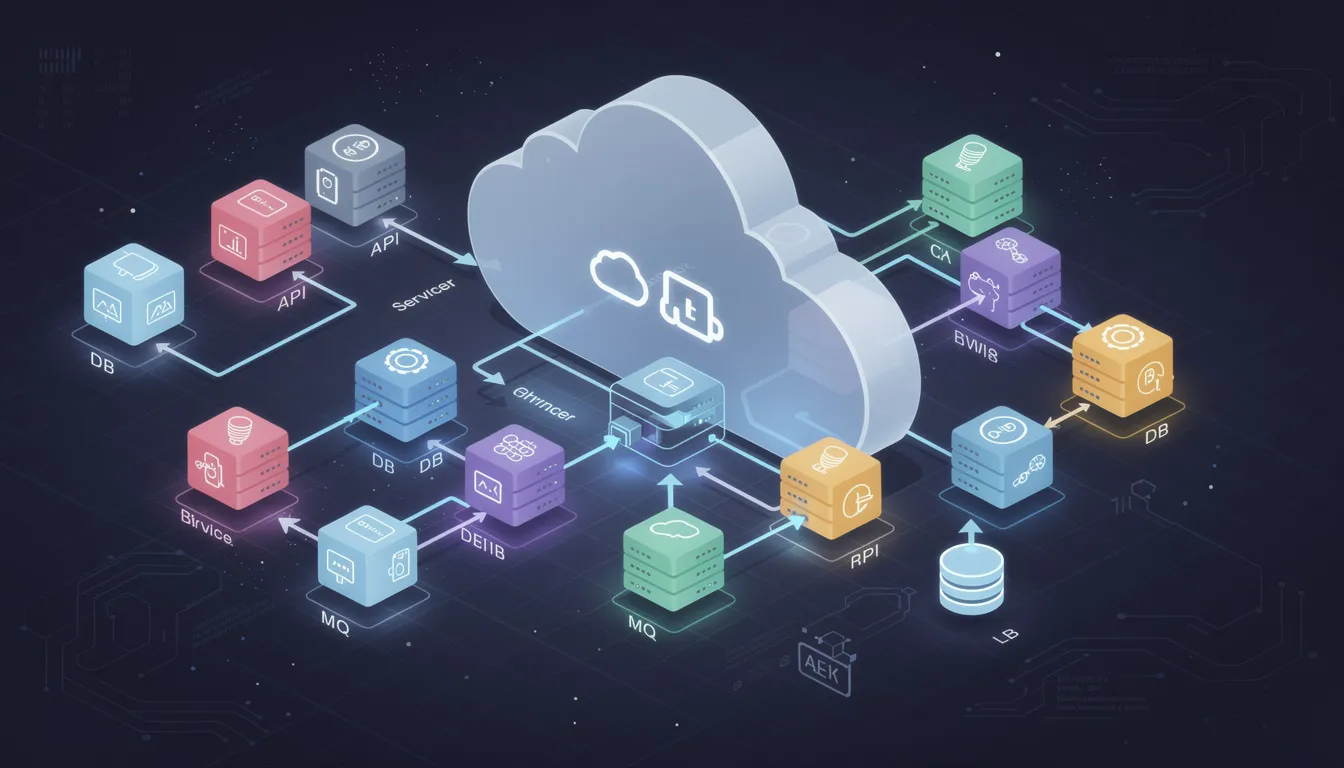
Modern cloud-native systems rely heavily on the application programming interface as the foundation for scalable architecture. Teams once depended on a code first approach, where developers wrote backend logic before defining how services communicate. That model created gaps in web development, delayed early feedback, and made it harder to build apis that aligned with business goals.
An api first company instead prioritizes designing contracts before developing apis, which clarifies why api strategy matters across the entire system. Clear specifications help teams manage internal apis, handle sensitive data, and ensure secure ways to transfer data between services.
Standard formats like query language structures also improve consistency. With this method, teams can automate processes, conduct load testing earlier, and define functionality in a single line contract that guides development beyond traditional code first limitations.
What Is API-First Architecture In Cloud-Native Development
API first architecture in cloud-native development means treating your api design as the primary deliverable before writing implementation code. Teams create an api specification using formats like OpenAPI 3.1 or GraphQL SDL, defining api endpoints, data models, and http methods upfront. This api contract becomes the single source of truth for frontend developers, backend engineers, and third party developers alike.
Industry data shows that applications must reach market in six months or less to stay competitive. The api first methodology supports this timeline by enabling parallel development workflows. Frontend teams build against mock servers while backend engineers implement the core functionality. By 2026, analysts predict that 80% of enterprises will adopt some form of api first strategy for their software development process. Cloud-native systems depend on this approach because microservices require stable, well defined apis to communicate reliably across distributed environments.
7 Benefits Of API-First Architecture
API-first architecture plays a critical role in cloud-native development by enabling scalable, modular, and integration-ready systems. Clear API contracts allow teams to build, deploy, and evolve services faster without dependency bottlenecks.
1. Faster Microservices Deployment
Microservices architecture breaks large applications into smaller, independent services that communicate through apis. When you adopt an api first design, each service gets a clear api contract before development begins. This clarity eliminates the back-and-forth confusion that typically slows down development teams working on interconnected services.
The development process becomes predictable. Engineers know exactly what api requests each service accepts and what http status code responses to expect. Swiss Federal Railways adopted mandatory api first reviews and reported significant improvements in api quality and discoverability across their entire api lifecycle. Their standardized approach reduced deployment friction because services could integrate without extensive coordination meetings.
2. Stronger System Decoupling
Decoupling means that changes in one service do not break others. API first architecture enforces this separation by treating the api as a boundary between components. Each service owns its internal logic, but the api adheres to a published contract that consumers depend on.
Consider a scenario where your billing service needs a complete rewrite. With proper api design, you can replace the entire system behind the api without touching any consuming applications. The api endpoints remain stable. The data model stays consistent. Frontend applications, mobile apps, and third party services continue working normally.
This decoupling supports team autonomy. Different development team groups can own different services without constant coordination. One team manages user authentication. Another handles inventory. A third focuses on order processing. Each team operates independently as long as their apis follow the agreed specification.
3. Scalable Service Communication
Cloud-native applications handle variable traffic loads. API first architecture makes scaling straightforward because services communicate through standardized interfaces. When one service experiences high demand, you scale that specific service without affecting others.
Rest apis with proper http methods handle this gracefully. Load balancers distribute api traffic across multiple instances of a service. The api contract remains unchanged regardless of how many instances exist behind it. Consumers send api requests to the same endpoints whether one server or fifty servers process them.
4. Seamless Multi-Cloud Integration
Modern businesses rarely run on a single cloud provider. API first architecture simplifies multi-cloud deployments because apis abstract away infrastructure differences. A service running on AWS communicates with another service on Azure through standardized api calls.
The api acts as the integration layer. It does not matter which programming language each service uses or which cloud platform hosts it. The api specification defines the contract. Any service that implements that contract can participate in the system.
5. Improved Developer Productivity
Developer experience directly impacts how much effort teams spend building and maintaining software. API first architecture improves this experience through clear documentation, consistent patterns, and automation-friendly interfaces.
Interactive documentation generated from OpenAPI specifications lets developers save time learning new apis. Tools like Swagger create browsable api documentation automatically. Developers explore api endpoints, see request and response examples, and even test api calls directly from the documentation. This reduces onboarding time for new features and new team members.
Thorough documentation also helps non technical team members understand what the system can do. Product managers reference the api documentation when planning features. Support staff check api documentation to troubleshoot customer issues. Api stakeholders across the organization benefit from clear, accessible specifications.
6. Consistent Governance And Security
Api governance ensures that all apis in your organization follow consistent standards. API first architecture makes governance practical because every api starts with a reviewable specification document.
Before any code gets written, other stakeholders review the api design. They check naming conventions, response formats, authentication requirements, and versioning strategies. Problems caught at this stage cost far less to fix than issues discovered after implementation.
Api security improves when security requirements appear in the specification from day one. OAuth 2.0 flows, api keys management, and json web tokens authentication all get defined during api design. The implementation must protect data according to the documented security model.
7. Future-Proof Architecture Flexibility
Technology changes rapidly. API first architecture protects your investment by decoupling your interfaces from their implementations. When new features, new languages, or new platforms emerge, your apis remain stable while internals evolve.
Building blocks of your system can be replaced independently. A service written in Java today might become a Rust service tomorrow if performance demands it. The api contract does not change. Consumers never know the difference.
Versioning strategies handle breaking changes gracefully. When you must change an api in ways that affect consumers, you release a new version at a different path. Old consumers continue using the previous version until they migrate. This prevents the chaos of forcing all consumers to update simultaneously.
Why Cloud-Native Systems Depend On API-First Design
Cloud-native architecture assumes that services run as independent units that communicate over networks. This distributed nature requires reliable, well documented interfaces between every component. API first design provides exactly this reliability.
Service Discovery And Communication
Services in cloud-native environments come and go dynamically. Containers start and stop based on demand. API first design means each service advertises a stable interface regardless of where it runs. Service discovery mechanisms route api traffic to healthy instances automatically.
Container Orchestration Integration
Kubernetes and similar platforms manage thousands of containers across clusters. These orchestrators need to understand how services communicate. Well defined apis with health check endpoints let orchestrators route traffic intelligently. Failing services get removed from load balancers before they degrade user experience.
Event-Driven Architecture Support
Cloud-native systems often combine synchronous api calls with asynchronous events. API first thinking applies to both patterns. Event schemas define the data model for messages just as api specifications define request and response formats. Consumers depend on stable contracts whether they receive data through api requests or event streams.
Observability And Monitoring
Distributed systems need extensive monitoring. API first architecture makes observability practical because every interaction follows documented patterns. Monitoring tools track api requests, response times, and error codes consistently. When problems occur, engineers trace api calls across services to identify root causes.
Continuous Deployment Pipelines
Cloud-native teams deploy frequently, sometimes multiple times per day. Api testing validates compatibility before each deployment. Automated testing suites verify that api endpoints return expected responses. Contract tests confirm that producers and consumers remain aligned. This testing confidence enables the rapid deployment cadence that cloud-native development demands.
Key Components Of An API-First Cloud-Native Stack
Building an api first cloud-native system requires specific tools and practices. Each component serves a purpose in the software development lifecycle from design through production operation.
API Specification Formats
OpenAPI Specification in YAML or JSON format describes rest apis comprehensively. The specification covers endpoints, parameters, request bodies, responses, and authentication. GraphQL SDL serves a similar purpose for GraphQL apis. These machine-readable formats enable automation throughout the entire api lifecycle.
Mock Server Infrastructure
Mock servers like WireMock simulate api behavior before real implementations exist. Frontend teams build complete user interfaces against mocked responses. Quality assurance tests edge cases without depending on fragile test environments. Mock apis accelerate the development process significantly.
Contract Testing Tools
Pact and similar tools verify that api producers and consumers agree on contracts. Consumer tests define expectations. Producer tests confirm implementations meet those expectations. Mismatches fail builds before reaching production, preventing integration failures that frustrate users.
API Gateway Management
Gateways handle cross-cutting concerns like authentication, rate limiting, and routing. They sit between consumers and your services, enforcing api governance policies consistently. Modern gateways support both rest apis and GraphQL, routing api traffic appropriately based on request characteristics.
Documentation Generation
Tools generate interactive documentation from api specifications automatically. Swagger UI creates browsable interfaces where developers explore endpoints and test api calls. This api documentation stays synchronized with the actual implementation because both derive from the same specification source.
Common Challenges In API-First Cloud-Native Adoption
Transitioning to api first development involves organizational and technical changes. Understanding common challenges helps teams prepare and succeed.
Initial Design Overhead
Api first requires upfront investment in design before visible progress appears. Teams accustomed to shipping user interface prototypes quickly may feel frustrated. The api design process takes time, involving workshops with api stakeholders, domain modeling, and specification writing. This investment pays dividends later but requires patience initially.
Team Skill Gaps
Not every developer has experience designing apis as products. Skills like resource modeling, versioning strategy, and security design need development. Some teams benefit from training or consulting during initial adoption. Internal developers may need guidance on http methods, error handling patterns, and api security best practices.
Legacy System Integration
Existing systems often lack clean api boundaries. Databases expose internal schemas directly. Monolithic applications tangle business logic with data access. Creating facade apis in front of legacy systems takes effort. Teams must balance modernization against ongoing feature delivery.
Governance Process Resistance
Lightweight governance improves quality, but excessive process slows teams down. Finding the right balance requires iteration. Some organizations over-engineer review processes that frustrate developers. Others skip reviews entirely and end up with inconsistent apis. Effective api governance involves just enough oversight to maintain standards without becoming bureaucratic.
Cultural Shift Requirements
API first changes how teams think about their work. Engineers become interface designers. Product managers must understand api consumers. Success requires buy-in across the organization. Teams that treat api first as purely a technical initiative often struggle compared to those who embrace the organizational changes involved.
How GainHQ Supports API-Driven Cloud-Native Teams
GainHQ understands that modern development teams need tools designed for integration from the start. The platform applies api first architecture principles to help businesses build scalable, maintainable systems without the integration headaches that slow traditional development.
GainHQ accelerates api development through integrated api management tools. Teams design, mock, test, and deploy apis rapidly using workflows optimized for microservices architecture. The platform supports parallel development for web and mobile teams, ensuring consistent api contracts across all consumers.
Analytics capabilities track api traffic and usage patterns, helping teams optimize performance and maintain api security. Companies using GainHQ report faster time-to-market and greater reusability of services. For teams adopting api first strategy, GainHQ provides the building blocks needed to succeed. Learn more at test.gainhq.com.
FAQs
How Does API-First Architecture Improve Cloud Scalability?
API first architecture improves scalability by creating clear boundaries between services. Each service scales independently based on its specific load requirements. When one api endpoint receives heavy traffic, you add more instances of that service without scaling the entire system. Load balancers distribute api requests across instances automatically. This granular scaling approach uses cloud resources efficiently and keeps costs manageable.
What Is The Difference Between API-First And Service-Oriented Architecture?
Service-oriented architecture (SOA) focuses on organizing applications into reusable services. API first architecture focuses specifically on designing the interface before implementing the service. You can practice api first within SOA or microservices architectures. The key distinction is timing and priority. Api first means the api specification comes before code, while SOA describes how services relate to each other organizationally.
When Should Companies Transition To API-First Design?
Companies benefit from api first adoption when they face integration challenges, plan microservices migrations, or need to support multiple client applications from shared backends. Startups can adopt api first from their first sprint, avoiding costly rewrites later. Established companies often transition one domain at a time, creating facade apis for legacy systems while building new features api first.
How Does API-First Support Continuous Delivery Pipelines?
Api specifications enable automated testing throughout delivery pipelines. Contract tests verify that api changes remain compatible with consumers. Mock servers let teams test integrations without depending on shared environments. Code generation creates consistent client libraries automatically. These automations give teams confidence to deploy frequently, sometimes multiple times daily.
Which Tools Help Manage API Lifecycle Effectively?
Popular tools include OpenAPI for specification writing, Swagger for documentation generation, and Postman for api testing. WireMock creates mock servers for development. Pact handles contract testing between producers and consumers. API gateways like Kong or AWS API Gateway manage production traffic. Version control systems store api specifications alongside code, enabling proper change tracking and collaboration.
Startups often face tough odds when developing software, especially during the early stage when teams operate with limited resources and tight timelines. A clear startup software development process helps founders reduce risks, control development costs, and move toward product-market fit faster. Many successful teams adopt lean software development principles to focus on core functionality, validate ideas early, and avoid unnecessary features that slow time to market.
A structured process also aligns technical execution with business goals such as customer acquisition, scalability, and a strong marketing strategy. Each phase, from idea validation to post-launch support, plays a critical role in shaping a reliable software product. A well-planned workflow ultimately leads to a strong conclusion software development outcome where quality, user satisfaction, and future growth remain fully supported.
What Is Startup Software Development Really About?
Software development for startups is not about writing perfect code. It is about reaching concrete business milestones. Your first MVP launch, your first 1,000 users, and preparing for Series A are all moments that depend on how well you build and ship software.
For early-stage teams, the development process serves as a validation engine. You are not just building features. You are proving that your business model works, that customers will pay, and that you can differentiate in a crowded market. Many venture-backed SaaS startups aim to ship an MVP in 8 to 16 weeks after funding. That timeline forces discipline.
There is a meaningful difference between building a polished product and building the smallest testable version that can survive real usage. The second approach wins for startups. Shipping fast, gathering user feedback, and iterating based on data beats spending months on features nobody asked for.
The rest of this article walks you through a pragmatic process that founders and product leaders can follow. Each phase has clear deliverables, realistic timelines, and practical advice grounded in what works for early-stage teams in 2025.
Purpose of Software Development in a Startup Context
Founders build software for four main reasons. They want to validate ideas, scale operations, collect data, and improve customer experience. Each of these reasons shapes how you approach building software and what you prioritize at different stages.
Understanding why you are building helps you make better decisions about scope, team, and timeline. A startup testing a hypothesis needs different things than a startup handling 5x user growth.
Validating the Business Idea and Market Fit
Pre-seed and seed startups typically use software to test a very specific hypothesis. For example, you might want to prove that SMB teams will pay $15 per month per user for simpler help desk software. The software becomes your testing instrument.
A realistic minimum viable product in 2024 and 2025 looks like this: a small, focused feature set, usable UX, basic analytics, and simple onboarding. Nothing more. A B2B SaaS founder might launch a basic issue-tracking app to 20 design partners before investing in automation features. That approach lets you learn before you burn through runway.
Time-bound experiments keep you honest. Think in terms of 4 to 6 week MVP sprints and 30 to 60 day validation windows. Define specific success metrics before you build. Activation rate, retention, and conversion are numbers that tell you whether product market fit is emerging.
CB Insights research shows that 42% of startups fail because there is no market need. Validating early and validating often protects you from that fate.
Supporting Growth and Operational Scale
Once initial fit is proven, software shifts from testing to enabling scale. You need to handle more users, more teams, and more geographies without breaking.
Cloud providers like AWS, Azure, or Google Cloud let you scale from hundreds to tens of thousands of users without building a full infrastructure team. That flexibility matters when your resources are limited.
Internal tools also become important. Custom dashboards, lightweight admin portals, and automated workflows reduce manual operations. Consider a startup that automates customer onboarding and ticket routing. That team can handle 5x user growth without 5x headcount. The software product pays for itself through efficiency gains.
Gathering Data and Feedback to Drive Decisions
Modern startup software is instrumented from day one. Tools like Mixpanel, Amplitude, or simple in-app event tracking give you visibility into user behavior. You can see what features people use, where they drop off, and what drives retention.
Early-stage teams should focus on specific data types: funnel metrics, feature usage, time-to-value, and customer support patterns. These numbers guide your roadmap decisions.
Structured feedback loops matter too. Surveys, in-app NPS, and customer interviews feed directly into your product backlog. You need a rhythm for this. Monthly or bi-weekly product reviews where data and feedback directly change priorities keep your team focused on what matters.
The goal is to gather user feedback continuously and analyze data systematically. Decisions based on real information beat decisions based on assumptions.
11 Practical Phases of a Startup Software Development Process
Unlike rigid enterprise lifecycles, the startup software development lifecycle follows clear phases with more iteration and shorter cycles. These 11 phases do not always happen strictly in sequence, but this order reflects what most successful SaaS and product teams follow.
Each phase should have explicit deliverables. A problem statement, validated prototype, working MVP, and release plan are all concrete outputs that keep progress visible.
1. Problem Discovery and Ideation
Founders start from a narrow problem, backed by 10 to 30 user interviews and market research, not just a feature idea. The goal is to understand the pain deeply before proposing solutions.
Problem interviews, job stories, and simple discovery workshops with the core team help you get specific. Picture a support team drowning in email and spreadsheets. That pain leads to a need for a shared, organized help desk. The problem is clear and concrete.
Deliverables at this stage include a one-page problem brief, a draft value proposition, and a list of risky assumptions. You are not building yet. You are defining what to build and why.
2. Product Discovery and Market Validation
Now you turn raw ideas into a more precise concept. Who is the target persona? What are the main use cases? What is the willingness to pay? Who are the competitors?
Simple experiments validate demand before building. Landing pages with waitlists, clickable prototypes, or concierge services let you test interest. Industry benchmarks suggest aiming for a minimum 5 to 10 percent sign-up rate on a targeted landing page. That signal tells you whether target users care enough to take action.
The outcome should be a basic business case. You know who will buy, why now, and at what rough price point. This idea validation step saves months of wasted development time.
3. Defining Monetization and Business Model
Common SaaS models include monthly and annual subscriptions, freemium with paid tiers, and usage-based pricing. For SMB tools, price ranges often fall between $10 and $50 per user per month at the lower end, scaling up based on features and value delivered.
Align monetization with customer value moments. Charging per agent seat makes sense for a help desk tool. Charging per ticket might create friction and churn because customers feel punished for getting more support requests.
Monetization experiments can start simple. You can revisit and refine pricing after your first 50 to 100 paying customers. The business strategy evolves as you learn what customers value most.
4. UX Strategy, Design Thinking, and UI Design
The design stage should start with user journeys and story maps rather than high-fidelity screens. Understanding how users move through your product matters more than picking the right colors.
Tools like Figma, FigJam, or Sketch support modern design practices. Design systems and component libraries help small teams stay consistent. For B2B startup software, clarity and speed often matter more than flashy visuals. Onboarding flows and empty states need careful attention because they shape first impressions.
Deliverables include low-fidelity wireframes, a clickable prototype, and a small but reusable design system. The user interface should serve the core functionality without adding unnecessary complexity.
5. Choosing a Technology Stack that Matches Runway
Frame stack choice around team skills, hiring market, and time to market rather than trends. The best tech stack is one your development team can build with quickly and that you can hire for later.
Grounded combinations work well for most startups. React plus Node.js plus PostgreSQL on a major cloud provider covers many web SaaS use cases. React Native or Flutter handle cross-platform mobile needs.
Technical trade-offs matter at early stages. Many startups start with a monolithic architecture to move faster. Modular architecture comes later when scaling demands it. Reliability and maintainability beat exotic stacks that are hard to hire for.
Stack Component
Common Choices
When to Use
Frontend
React, Vue, Next.js
Web SaaS with dynamic interfaces
Backend
Node.js, Python, Go
APIs and business logic
Database
PostgreSQL, MongoDB
Relational or document data needs
Mobile
React Native, Flutter
Cross-platform mobile apps
Cloud
AWS, Google Cloud, Azure
Scalable infrastructure
6. Selecting Development Methodology and Planning Sprints
Most startups pick Agile or Lean approaches with 1 to 2 week sprints and frequent releases. Agile development provides the flexibility to adapt when you learn new things about your market.
Product owners and tech leads collaborate on a prioritized backlog, sprint goals, and clear acceptance criteria. A minimal, realistic toolset supports this collaboration. Project management tools like Jira or Linear handle work tracking. Slack or Microsoft Teams handle communication.
Regular ceremonies keep the team aligned. Planning, daily check-ins, review, and retrospective sessions should each stay short and focused. The lean methodology emphasis on avoiding waste applies to meetings too.
7. Building the MVP: Scope, Speed, and Trade-offs
Slice your MVP down to a single primary workflow. For a help desk tool, that might mean “log a customer issue, assign it, and track status.” That is your core functionality. Everything else can wait.
Timeboxing MVPs to 8 to 12 weeks works for many SaaS products, depending on complexity and team size. Rapid development requires discipline about scope. Accept some manual work and missing automation in v1 to stay within budget.
The MVP must still be stable and secure enough for external users. This is not a rough internal prototype. Early adopters will judge your startup by what they experience. Basic functionality needs to work reliably.
MVP development is about proving value, not showcasing technical expertise. Build the essential features first. Future development can add the rest.
8. Quality Assurance and Testing from Day One
Even very early-stage startups need a baseline of testing. Unit tests for core logic, smoke tests for key flows, and regression checks before each release protect against embarrassing failures.
Specific quality assurance practices include test environments, feature flags, and using staging data close to production scenarios. Lightweight automation handles repetitive tests. Continuous integration pipelines run for every pull request.
Automated testing catches problems before they reach users. Bugs impacting billing, data loss, or user trust must be prioritized above cosmetic issues. Code quality matters even when you are moving fast.
9. Deployment, Release Management, and Observability
Startups use CI/CD pipelines to deploy frequently. Some teams ship multiple times per day without disrupting users. The software development process includes making releases routine rather than risky events.
Best practices include blue-green deployments, canary releases, and feature flags for risky changes. These techniques let you roll back quickly if something goes wrong.
Monitoring and logging stacks track errors and performance. Datadog, New Relic, or open-source alternatives give visibility into what is happening in production. A clear incident response process becomes essential as soon as there are paying customers.
10. Post-launch Support, Iteration, and Roadmap Updates
Once the MVP is live, teams move into tight cycles. Analyze metrics, prioritize improvements, and ship small updates every sprint. Iterative development becomes your operating rhythm.
Specific signals should drive roadmap changes. Frequent support tickets about the same pain point suggest a priority fix. Low feature adoption means you built something users do not need. Poor onboarding completion points to UX problems.
Customer success, support, and product teams share insights in weekly or bi-weekly review sessions. Post launch support is not separate from development. It feeds directly into what you build next.
The roadmap is a living document. It should stay aligned with revenue goals and upcoming funding milestones. User satisfaction drives retention, and retention drives growth.
11. Scaling Architecture, Team, and Process
The transition from early-stage “single team shipping everything” to multiple squads or pods owning different parts of the product is a significant shift. Software projects become more complex as you grow.
Common scale challenges include database performance under higher load, background jobs, and increased security and compliance needs. A startup that hits 10,000 daily active users often needs to refactor reporting or background processing layers.
This is often the point where startups adopt stricter coding standards, stronger quality assurance, and more formal release policies. Documentation becomes more important. Future growth depends on systems that can handle increased demand without constant firefighting.
Key Process Best Practices for Startup Teams
These focused practices improve outcomes regardless of tech stack or industry. Consider this advice from someone who has seen what works and what does not for early-stage teams.
Start with the Smallest Useful Release
Saying “no” to extra features until the core workflow is proven by real users requires discipline. It is tempting to add advanced reporting, deep integrations, complex role management, and custom theming. Defer all of it.
Reducing scope lowers initial development costs and makes later pivots easier. If you need to change direction, you have invested less in the wrong path. The startup development philosophy favors learning over building.
Make Decisions Based on Real Data, Not Anecdotes
A simple analytics setup gives you the information you need. Event tracking, funnels, cohort analysis, and basic product KPIs like activation and weekly active users reveal patterns.
Qualitative feedback from 10 to 20 good customer conversations is more useful than unstructured comments from a large group. Continuous improvement depends on knowing what is working and what is not.
Establish a cadence for revisiting metrics. Weekly product reviews and monthly strategy reviews keep data central to decision making.
Do Not Skip Product Discovery, Even Under Pressure
Founders often feel time-pressed and want to jump straight into coding. That instinct makes sense given runway constraints. But two to four weeks of serious discovery work can prevent months of wasted build time.
Simple discovery activities include mapping user journeys, competitor teardown sessions, and structured user interviews with target users. This work reduces risk before you commit development resources.
Document the Essentials as You Go
Lightweight documentation practices fit early-stage life. Concise decision logs, architecture overviews, and API docs capture knowledge without creating bureaucratic overhead.
Documentation reduces onboarding time for new software developers and prevents knowledge from living in a single person’s head. Clear runbooks for production incidents and release processes become important once there is real revenue at risk.
Stay Honest About Resource Limits and Trade-offs
Founders constantly juggle development, marketing, sales, and fundraising with a small team. That reality shapes what you can build and when.
Concrete strategies help with constraints. Focus on one primary persona. Postpone less critical platforms like native mobile until web proves traction. App development for multiple platforms can wait until you have validated demand.
Sometimes it makes sense to look for external help. Specialists for security reviews, performance tuning, or complex integrations with third party services bring expertise your team may not have.
Team Setup: In-house, Hybrid, or External Partners
The right team model depends on product complexity, budget, and how technical the founding team is. Many successful startups blend a small in-house team with selected external specialists rather than relying on a single model.
When to Build an In-house Product and Engineering Team
Having core engineers and product people on payroll makes sense for deep-tech or long-term platform plays. When the product is central to competitive advantage, you want that expertise internal.
The real costs add up quickly. Salaries, benefits, hiring time, and management overhead must be considered. In major tech hubs, senior software developers command salaries well into six figures. Remote markets offer lower costs but require strong async communication practices.
An in house team works best when founders can give ongoing technical direction and unblock decisions quickly. Project managers and business analysts often join as the team grows beyond a handful of people.
Using Freelancers and Specialists for Focused Needs
Startups use freelancers for narrow, time-bound work. UI polish, analytics setup, specific integrations, or one-off audits are good candidates for contract work.
Code standards, review practices, and clear contracts matter. Short-term contributors should not harm long-term maintainability. Keep core product decisions and architecture direction with permanent team members.
Partnering with External Product and Development Teams
A stable external team makes sense when founders are non-technical or need to move faster than hiring allows. Outsourcing software development provides capacity without the overhead of building an in-house team.
When evaluating a software development partner or startup software development company, look for transparent communication, experience with startup lifecycles, strong product thinking, and clear delivery practices. Shared tooling, joint sprint planning, and clear ownership boundaries between your startup and partner engineers reduce friction.
An outsourced development team can deliver custom software development at a predictable pace. The key is finding a software development company that understands startup constraints.
Cost, Timeline, and Risk: Setting Realistic Expectations
Understanding what early-stage teams can expect in terms of cost ranges, durations, and risk points helps you plan more effectively.
Typical Cost Ranges for Startup Software
Building an initial SaaS MVP in 2024 and 2025 varies widely based on complexity. A very simple tool might cost in the low five figures. More complex or integrated products can reach six figures for the initial build.
Project Type
Approximate Cost Range
Typical Timeline
Simple web app MVP
$20,000 - $50,000
6-10 weeks
Standard SaaS MVP
$50,000 - $150,000
10-16 weeks
Complex product
$150,000+
16+ weeks
Software development cost breaks down across several areas. Product and design work, backend and frontend development, testing, infrastructure, and ongoing maintenance all consume budget. Keeping scope focused and reusing existing components or services significantly reduces costs.
The custom software development process becomes more expensive as requirements grow. Develop custom software for what differentiates you. Use existing services for everything else.
How Long Does It Take to Reach First Release
Realistic timelines for each stage vary by complexity and team size. A few weeks handles discovery and design. A couple of months covers MVP development. Additional months allow for refinement based on early feedback.
Several factors add time to any project. Major pivots mid-build force rework. Unclear requirements create confusion. Changing priorities disrupt flow. Team churn means knowledge loss and onboarding delays.
Leave buffer time between MVP and public launch. Issues from early testers need fixing before you scale up. Time to market matters, but launching a broken product hurts more than launching a week later.
Identifying and Managing Key Risks Early
Main categories of risk include technical feasibility, adoption risk, regulatory requirements, and funding risk. Each can derail a project if ignored.
Even small teams benefit from explicit risk registers with probability and impact noted for each item. That visibility helps you prioritize mitigation work.
Mitigation moves include proof-of-concept spikes for technical risk, staged rollouts for adoption risk, legal consultations for regulatory concerns, and careful monitoring of burn rate versus milestones. Market conditions change, so revisit risks regularly.
Rapid prototyping and rapid application development approaches help validate technical feasibility early. Build a small version of the risky part before committing fully.
How Gain HQ Supports a Healthy Startup Software Development Process
Gain HQ’s products and philosophy connect directly to the pain points covered throughout this article. For startups trying to move from idea to reliable release, having the right tools and approach makes a measurable difference.
Keeping Product and Engineering Organized Around Real Work
Gain HQ helps small teams centralize tasks, discussions, and documentation so that project managers, founders, and developers stay aligned. Everything lives in one place rather than scattered across email, chat, and spreadsheets.
Shared boards manage discovery tasks, development tickets, bugs, and release plans together. That visibility reduces context switching and information fragmentation. When your development team knows what matters most, they can focus on delivering the key features that drive value.
For building software at startup pace, clarity about priorities prevents wasted effort. Programming languages and data storage decisions are easier when the whole team understands the product goals.
Improving Communication and Feedback Loops
Gain HQ supports structured conversations around features, customer feedback, and incidents. You do not have to rely only on informal chat tools where messages get lost.
Teams can link customer issues to internal tasks. Each release ties directly back to user needs and business goals. That connection shortens decision time and helps avoid delays between product, engineering, and customer-facing teams.
Clearer communication supports successful software development. When you can trace from customer request to shipped feature, everyone understands the impact of their work.
Supporting Repeatable, High-Quality Releases
Gain HQ’s approach and tooling make release planning, prioritization, and tracking more predictable. Agile practices become sustainable when the supporting systems work smoothly.
A consistent shipping rhythm benefits everyone. Weekly or bi-weekly releases become achievable even with small teams. That predictability increases investor and customer confidence as the software product scales.
The development phase flows more smoothly when tools support rather than hinder the process. For successful software product delivery, systems matter as much as skills.
FAQ
How early should a startup bring in dedicated QA or testing support?
For most startup software development processes, some form of quality assurance should be present from the first sprint. Developers and product people can handle initial testing. Dedicated QA specialists typically become important when the team reaches four to six engineers or when releases start going out weekly.
Can a non-technical founder successfully lead a software development process?
Non-technical founders can lead product and business decisions effectively. However, they should have strong technical partners. A CTO, experienced tech lead, or trusted external team provides the technical direction needed.
How do I know if my startup is ready to move beyond an MVP?
Several signals indicate readiness. Stable activation and retention numbers suggest the core value proposition works. Repeat usage from a meaningful user base shows stickiness. Clear patterns in feature requests point toward expansion opportunities. Strong interest from customers and investors, combined with growing operational pain in the current version, indicates it is time to invest in a more robust product.
What is a reasonable release frequency for an early-stage startup?
Many high-performing teams release small changes weekly or even several times per week. Very early or complex products might ship every two weeks. The agile development approach favors frequent, small releases over infrequent large ones. Consistency matters more than sheer speed. Each release should add value without destabilizing the product.
Start with essential security practices. Secure authentication, data encryption, least-privilege access, and regular dependency updates form a baseline. These fundamentals protect users and build trust. Formal certifications like SOC 2 or ISO 27001 often become necessary as the startup sells to larger customers or handles sensitive data.
Software development pricing models shape how businesses plan budgets, control risk, and ensure project success. From a fixed price model with a well defined scope to a flexible time and material model, each pricing model affects project costs, financial risk, and the overall software development process. Many software companies rely on common pricing models such as fixed price contracts, a dedicated team model, or a time and materials contract for complex projects.
Choosing the right pricing model depends on project requirements, development costs, and customer perceived value. Some clients pay through subscription pricing model options, per user pricing, or usage based pricing, especially in SaaS pricing models. Others prefer a hybrid pricing model or mixed pricing model to balance predictable costs with flexibility. A clear pricing strategy helps a development company align project scope, manage hidden costs, and deliver custom software development efficiently.
What Is A Software Development Pricing Model
A software development pricing model defines how clients pay for a software project. It outlines the structure of software development pricing, payment terms, and risk allocation. Software development pricing models help a software company set clear expectations before work begins. A pricing model also connects project scope, development costs, and overall project management. Clear software development contracts reduce hidden costs and financial risk.
Common pricing models include the fixed price model, time and material model, and dedicated team model. A fixed price approach works best with a well-defined scope. A time and materials contract suits complex projects with changing requirements. A dedicated team pricing model supports long-term custom software development. Choosing the right pricing model ensures project success and better cost control.
Fixed Price Model For Software Development
A fixed price model sets a total cost before software development begins. The service provider agrees to deliver the full software project at that fixed price, no matter the actual development costs. Fixed price contracts transfer most financial risk to the vendor. Many businesses choose this pricing model for predictable costs and clear software development contracts.
When To Use Fixed Price Model
A fixed price approach works best for small or mid-sized software development projects. Stable requirements and clear documentation are key factors. Projects with completed designs or limited feature updates suit this development pricing model.
Fixed price contracts fit website builds, system upgrades, and short-term custom software development. Public organizations and startups often prefer this pricing strategy for budget certainty. A clear scope helps ensure project success.
Pros And Cons Of Fixed Price Model
The biggest benefit is predictable costs. Clients pay a flat rate pricing amount agreed in advance. Project management becomes easier because budgets stay fixed. Financial risk shifts to the development company.
Limitations also exist. Flexibility remains low once the contract is signed. Any change in project requirements leads to extra charges. Vendors may add risk margins to protect profit. That can increase overall development pricing.
Common Pitfalls To Avoid
Scope freeze creates problems when new ideas appear. Change requests can slow progress and raise costs. Poor estimation may affect quality and timelines.
Clear communication, accurate documentation, and realistic expectations reduce hidden costs. A strong partnership between client and service provider supports project success under the fixed price model.
Time And Material Pricing Model
A time and materials contract bills clients for actual hours worked and materials used during software development projects. You pay for the trip rather than a predetermined destination. The billing structure has hourly rates for each team member, actual hours worked billed weekly or monthly, and material costs with markup.
How Time And Material Pricing Works
The time and material model operates on straightforward principles. Both parties agree on project goals without detailing every specification upfront. Hourly rates vary by role: senior developers, project managers and specialists each have different rates. Materials carry markup between 15% and 35% on actual costs.
Contractors track hours worked and material expenses. They provide detailed invoices to clients. Payment occurs periodically, often monthly. This ensures ongoing cash flow for contractors while allowing you to monitor costs. Modern T&M contracts frequently have a not-to-exceed clause that caps total costs. This provides budget limits while maintaining flexibility as project requirements evolve.
The contractor and client establish rates and terms before work begins. This has labor rates for each category, material billing and markup percentages, billing frequency and documentation requirements. As work progresses, contractors track labor hours using timesheets or time tracking software like JIRA or Redmine. Each entry documents who worked, tasks completed and applicable labor category.
Detailed invoices show hours worked by each role, hourly rates with total labor costs, itemized material costs with markup and supporting documentation. The client reviews invoices and verifies hours and materials, then approves payment. This transparency builds trust but requires accurate recordkeeping.
Benefits And Drawbacks
Flexibility stands as the biggest advantage. You can adjust requirements, incorporate user feedback, swap features and change direction to get the exact product you want. Projects adapt when scope evolves without complex contract renegotiations. Time and materials contracts offer flexibility, allowing easy changes to project scope and direction.
Work begins faster because negotiations focus on agreeing to rates for labor and materials rather than detailing work specifics. Projects can start within two weeks, beating fixed price agreements that need extensive planning. Development teams can begin building while details for later phases remain undefined.
Transparency emerges through detailed reporting. Contractors provide information about work performed continuously, keeping you closely informed on project status. Detailed invoices show exact time worked and materials used. This enables clear visibility into fund allocation. You can prioritize tasks based on changing business needs and market demands. This enables agile development where teams adapt to evolving requirements.
This model offers predictability and security for contractors. They know exactly the profit margin for each unit of work performed without concerns over scope arguments. Margins are lower under time and materials contracts but more predictable than fixed price contracts.
Budget uncertainty presents the biggest disadvantage. Final project costs may exceed original estimates, with T&M projects averaging 10-25% over original projections. Without upfront total cost, you face financial risk if project scope sprawls. This uncertainty complicates financial planning, especially for businesses with tight budgets.
The model demands active client involvement. You must review progress and time reports regularly, make continuous prioritization decisions and ensure efficient resource use. Detailed cost tracking places heavy administrative burden on both parties. Without efficient systems, managing these details becomes time-consuming and error-prone.
Best Use Cases For T&M Model
Time and materials contracts excel when project scope remains unclear or fully undefined upfront. They suit complex projects requiring flexibility, such as custom software development. Projects exploring new technologies, solutions without clear precedents or complex integrations with multiple systems work well with this approach.
This model aligns perfectly with agile development methodologies. Scrum or Kanban-based processes, projects prioritizing regular releases and development focused on delivering maximum value rather than predefined features benefit from T&M flexibility. Long-term partnerships where trust exists and projects evolving into maintenance phases also favor this structure.
Choose time and materials when requirements may change throughout the project timeline, you want flexibility to modify scope or change features during development, or technical uncertainty demands creative problem-solving.
Dedicated Team Pricing Model
Long-term software development projects need consistent expertise without the overhead of building an in-house team. The dedicated team model addresses this need through a partnership where remote developers work exclusively on your product or project. These professionals integrate fully into your workflow and follow your processes, culture and goals.
What Makes Dedicated Teams Different
Dedicated teams become an extension of your company rather than temporary contractors. They arrange with your vision and roadmap, which makes them suitable for long-term collaboration. This engagement model operates on a simple principle: fixed budget with flexible scope.
The team dedicates 100% of their time to your particular project. No switching between multiple clients. No divided attention. This exclusive focus leads to shorter turnaround times and higher quality work. Team members gain deeper understanding of your business model, challenges and goals. As a result, they look at the bigger picture and suggest solutions outside the project specification you started with.
You create project roadmaps together as sprints. Through agile working methods and constant communication, you stay on top of latest developments and know exactly what you're paying for. The development partner handles recruitment, onboarding, operational needs, team scaling and performance management.
Cost Structure And Payment Terms
The dedicated team pricing model uses monthly or quarterly payments. Your budget is derived from the number of team members you use each month. The invoice covers developer salaries plus a service fee per team member.
Regional location affects SaaS development costs substantially. Eastern Europe ranges from USD 35.00 to USD 60.00 per hour. South Asia, which has India and Pakistan, charges USD 25.00 to USD 45.00 per hour. Western Europe costs USD 60.00 to USD 100.00 per hour. North America commands USD 80.00 to USD 150.00 per hour.
Hiring a dedicated team in Ukraine with one developer costs USD 5300.00, where USD 3500.00 is the developer's salary and USD 1800.00 is the service fee. Building an offshore dedicated team can save up to USD 6220.00, or 54%.
The cost structure has salaries and benefits, infrastructure and tools, recruitment and onboarding, management overhead, and training to keep the team arranged with your future-proof technology stack. Service fees decrease as team size increases. The fee averages USD 1000.00 per team member for a five-member team.
When This Model Works Best
Startups building an MVP or scaling toward Series A funding benefit from dedicated teams. You move fast without over-hiring locally. SaaS platforms evolve constantly and need support for new features, integrations and ongoing maintenance while keeping costs predictable.
The team extension approach integrates remote developers naturally into your workflows when your in-house developers are overloaded. Enterprises upgrading outdated systems gain fresh expertise while ensuring smooth transition and stability.
This model excels for gross projects lasting a long time with ambiguous requirements and scope that changes due to complexity. It suits projects that need a variety of skills and expertise: designers, developers, DevOps, growth analysts and QAs. You can scale resources so you ramp up to meet demand or scale down during lean periods.
Other Software Pricing Models To Consider
Beyond the three main software development pricing models, several alternatives are a great way to get unique advantages for specific situations. These pricing models for software address different business needs and project structures.
Milestone-Based Pricing
Payments occur at predefined stages of the project. Each milestone represents completed work that has been approved. Complex long-term projects with clear stages or deliverables suit this pricing model.
Both parties manage risks more effectively when they break payments into milestones. Clients pay only for work completed to their satisfaction. Vendors maintain healthier cash flow and stay incentivized to meet deadlines and quality standards. The approach prevents scope creep because all payments and deliverables are agreed upon upfront. Clients become less likely to request changes outside defined milestones.
Milestone pricing transforms vendors from mere software providers into success partners with skin in the game. Companies with value-based pricing models experience 25% higher net revenue retention compared to seat-based or usage-based models alone. The model keeps vendors accountable for delivering meaningful business outcomes.
You need a deep understanding of customer processes and success metrics to define appropriate, measurable milestones. Milestone triggers can create less predictable revenue timing compared to subscription pricing models.
Value-Based Pricing Model
Value-based pricing sets prices according to the value customers see rather than production costs or competitor pricing. This pricing strategy emphasizes benefits and positive outcomes buyers gain from the product.
The model focuses on ROI that a SaaS business generates for users. You deliver value if your software helps users save or make more money than they spend working with you. Brand loyalty develops when you deliver consistent value over time. Loyal customers have greater lifetime value and continue subscribing, which results in greater profit margins due to lack of customer churn.
Customers become willing to pay higher prices as they develop brand loyalty. Customers begin valuing service over savings and pay a premium for quality products with service backing it up.
Product prices become harder to set. You need to spend time and energy understanding how customers view your product's value when you use value-based pricing. There's room for error when first setting prices with a value-based pricing strategy. The customer's perception might not always reflect your internal assessment and force you into a lower price.
Subscription And Retainer Models
A retainer subscription is an agreement where clients pay in advance for future work. This business model has become popular among professional services firms. The model offers predictable recurring revenue and promotes long-term client relationships.
Retainer pricing is different from subscription pricing. Retainer arrangements feature reserved capacity for as-needed work and dedicated personnel commitments. Subscription models involve standardized service packages, regular deliverables on set schedules and defined service levels.
Retainer pricing stabilizes fluctuating revenue and makes revenue forecasting more accurate. You can focus on client needs and deliver high-quality work rather than spend time looking for new clients. Clients rest assured knowing you have dedicated hours available.
Hybrid Pricing Approaches
Hybrid pricing merges multiple pricing structures into one. The model involves charging customers a fixed recurring fee and a variable charge based on usage or another value driver. 22% of SaaS businesses adopted hybrid models that mix subscriptions and usage-based fees in 2024.
A project management platform might charge USD 100.00 per month for core product access, USD 15.00 per additional user beyond the first 10 and USD 0.50 per gigabyte of storage beyond the first 100. Small teams staying within the base plan pay the flat fee. Larger teams with heavy storage use might pay four or five times that.
The fixed portion provides predictable recurring revenue and gives businesses a solid foundation for financial planning. The variable component adds flexibility and lets revenue grow with customer usage. Hybrid models tend to minimize churn because customers feel in control of what they pay.
Key Factors To Consider When Choosing A Pricing Model
Your software development pricing model choice depends on several interconnected factors. Selecting the right pricing model requires you to evaluate your project against specific criteria that determine which approach delivers optimal results.
Project Scope And Complexity
Project scope includes all aspects of your software development initiative, from original requirements to final deliverables. A clearly defined scope has detailed specifications, functionalities, and system architecture problems that are the foundations of accurate cost estimation. The larger your software project is, the more human resources and time it requires. This directly affects what clients pay for development.
Complex projects that require state-of-the-art technologies or innovative solutions tend to have higher development costs. Specialized skills and increased development time drive these costs up. High complexity and uncertainty often require time and materials or agile pricing approaches. Well-defined scopes suit fixed price contracts better.
Budget And Timeline Constraints
Budget expectations shape your pricing model selection by a lot. If you want to maintain control over monthly expenses, think over pricing models like fixed price or dedicated teams that offer more predictable costs. Models like time and material or milestone-based pricing may result in variable monthly payments.
Expected duration influences the choice. Fixed price contracts work best for short-term projects. Time and material and dedicated team models suit medium to long-term engagements better. Projects lasting from two to three months with ambiguous requirements favor flexible pricing models.
Level Of Control Required
Your desired involvement level determines model appropriateness. Fixed price models require less client involvement. Time and material and milestone models demand more active participation from clients. The phenomenal level of control in dedicated team pricing lets you personally view team members, increase or decrease team size, and assign tasks.
Team Size And Resources
Project size determines the appropriate software development pricing model. Time and material or milestone-based pricing may be enough for small projects that need only a few developers. Larger projects that require full teams with quality assurance specialists, designers, and project managers need dedicated team approaches.
Human resources' impact extends beyond team size. The specialty and seniority level of team members determine your expenses, not just team size alone.
Risk Tolerance
Different models allocate risk differently between buyer and vendor. Fixed price contracts move execution risks to the development company. Time and material models place cost risk with clients who directly bear budget changes tied to hours worked. Understanding your risk capacity helps match the pricing model to your comfort level with uncertainty.
How To Choose The Right Software Development Pricing Strategy
Choosing the right pricing strategy shapes your project costs, risk level, and long-term success. Software development pricing models must align with project scope, budget limits, and business goals. Clear evaluation of key factors reduces financial risk and improves project success rates.
Align Model With Project Scope
Project scope defines the best pricing model. A fixed price model suits a well-defined scope with stable requirements. Fixed price contracts protect clients from cost overruns and offer predictable costs. Standish Group reports that nearly 50 percent of projects face scope changes. Stable requirements reduce that risk.
Time and material model works better for complex projects. Flexible pricing models allow adjustments as needs evolve. Hybrid pricing model can balance certainty and adaptability where partial clarity exists.
Evaluate Complexity And Risk
Complex projects require flexible development pricing models. A time and materials contract supports agile workflows and frequent releases. Agile teams often prefer material pricing model because requirements shift during the software development process.
Fixed price approach increases vendor risk. Vendors may add contingency margins of 20 to 30 percent to cover hidden costs. Higher margins can raise total development costs for clients. Risk assessment protects both parties.
Review Budget Certainty Needs
Budget certainty drives many decisions. Fixed price pricing model ensures flat rate pricing and strong cost control. Clients pay a predetermined amount, which simplifies financial planning.
Cost-based pricing and value-based pricing may suit enterprise software pricing strategies. Where customer perceived value is high, value-based pricing can justify higher development pricing. SaaS pricing models often use subscription pricing model or tiered pricing for predictable recurring revenue.
Consider Team Structure
Team setup influences pricing strategy. The dedicated team model gives control over the development process and workload. Dedicated team pricing model works well for long-term custom software development.
A dedicated development team can scale as project requirements grow. Businesses without a strong in house team often choose this model. Clear communication reduces project management challenges and ensures project success.
Assess Vendor Capability
Vendor expertise matters more than reputation alone. Review technical skills, past software development projects, and estimation accuracy. Poor estimation increases hidden costs and delays.
Project Management Institute data shows that weak project management leads to significant budget loss globally. Strong service provider processes reduce financial risk. Transparent software development contracts build trust and clarity.
Plan For Long Term Growth
Short-term goals differ from long-term strategy. Fixed price contracts suit short engagements with limited scope. Long partnerships benefit from time and material model or hybrid pricing.
Growth often changes project requirements. Flexible pricing models adapt to the latest market trends, competitor pricing, and actual usage. Per-user pricing and usage-based pricing support SaaS expansion. The right pricing model supports scalability and sustainable project success.
Common Mistakes To Avoid When Selecting Pricing Models
Selecting software development pricing models involves avoiding several critical errors that derail projects and inflate costs.
Choosing Based On Price Alone
Companies outsource to cut costs, with 59% prioritizing budget efficiency. Choosing the cheapest software development pricing option backfires though. Low rates signal inexperience or inadequate project understanding. Development companies offering cheap services often lack the complexity awareness your project needs. The lowest fixed price may seem attractive, but you sacrifice quality and expertise.
Ignoring Hidden Costs
Original quotes focus on visible expenses. Hidden costs surface later throughout the development process. Fixed price contracts appear safe, but rigid scope control transforms affordable plans into expensive undertakings. Communication gaps and language barriers increase total costs through additional reviews and rework. Offshore development may reduce hourly rates, yet misunderstandings affect quality and performance to a high degree.
Lack Of Flexibility In Contracts
Software development contracts require flexibility. Rigid pricing models depend on detailed requirements, but gaps appear after development starts. Vendors treat extra requests as change orders and increase total project costs. Business value suffers when inflexible agreements result in delayed features.
Poor Communication With Vendors
Poor communication destroys projects. 57% of IT projects fail due to communication issues. Outsourced IT projects exceed budgets 62% of the time, with miscommunication causing timeline extensions that affect 70% of projects.
Why GainHQ Helps You Choose The Right Software Development Pricing Models
GainHQ helps businesses compare different pricing models with clarity and confidence. Every software project has unique project requirements, budget limits, and growth goals. GainHQ analyzes your project scope, development costs, and financial risk before suggesting the right pricing model. Clear evaluation of fixed price model, time and material model, or dedicated team model ensures balanced software development pricing and better project management outcomes.
GainHQ focuses on transparency in software development contracts and long term value. Expert consultants assess key factors such as complexity, team structure, and hidden costs. Whether you need predictable costs through a fixed price approach or flexible pricing models for complex projects, GainHQ aligns development pricing models with your business strategy. The result is lower risk, optimized project costs, and higher project success.
FAQs
Which Software Development Pricing Model Reduces Financial Risk The Most?
Yes, the fixed price model reduces financial risk for clients because total project costs are agreed upfront. Fixed price contracts transfer execution risk to the development company. However, flexibility becomes limited if project requirements change.
Can Software Development Pricing Models Affect Product Quality?
Yes, software development pricing models can influence quality outcomes. A strict fixed price approach may pressure vendors to protect margins. Flexible pricing models like time and material model allow better adaptation and quality control.
Is A Dedicated Team Model More Cost Effective Than Hiring An In House Team?
Yes, the dedicated team model often lowers overhead compared to building an in-house team. You avoid recruitment, infrastructure, and long-term employment costs. Dedicated team pricing model offers scalability with controlled development pricing.
Do SaaS Pricing Models Work For Custom Software Development Projects?
No, SaaS pricing models like subscription pricing model or per-user pricing mainly apply to product monetization. Custom software development usually relies on fixed price, time and materials contract, or hybrid pricing structures.
How Do Market Trends Influence Software Pricing Strategy?
Market trends, competitor pricing, and customer perceived value shape software pricing strategy. Businesses review actual usage, demand shifts, and pricing tiers to refine development pricing models. Data-driven pricing experiments improve long-term revenue stability.
What Role Does Customer Feedback Play In Pricing Decisions?
Customer feedback reveals perceived value and willingness to pay. Companies adjust value-based pricing or usage-based pricing after analyzing feedback. Strong feedback loops help optimize software pricing and reduce churn.
Are Hybrid Pricing Models Suitable For Enterprise Software Projects?
Yes, hybrid pricing models combine predictable costs with flexibility. Enterprises often use a mixed pricing model that blends fixed price elements with time and material billing. Hybrid pricing supports complex projects with evolving scope.
Used by Google Analytics to determine which links on a page are being clicked
30 seconds
_ga_
ID used to identify users
2 years
_gid
ID used to identify users for 24 hours after last activity
24 hours
_gat
Used to monitor number of Google Analytics server requests when using Google Tag Manager
1 minute
_gac_
Contains information related to marketing campaigns of the user. These are shared with Google AdWords / Google Ads when the Google Ads and Google Analytics accounts are linked together.
90 days
__utma
ID used to identify users and sessions
2 years after last activity
__utmt
Used to monitor number of Google Analytics server requests
10 minutes
__utmb
Used to distinguish new sessions and visits. This cookie is set when the GA.js javascript library is loaded and there is no existing __utmb cookie. The cookie is updated every time data is sent to the Google Analytics server.
30 minutes after last activity
__utmc
Used only with old Urchin versions of Google Analytics and not with GA.js. Was used to distinguish between new sessions and visits at the end of a session.
End of session (browser)
__utmz
Contains information about the traffic source or campaign that directed user to the website. The cookie is set when the GA.js javascript is loaded and updated when data is sent to the Google Anaytics server
6 months after last activity
__utmv
Contains custom information set by the web developer via the _setCustomVar method in Google Analytics. This cookie is updated every time new data is sent to the Google Analytics server.
2 years after last activity
__utmx
Used to determine whether a user is included in an A / B or Multivariate test.
18 months
PostHog is used to collect anonymous usage statistics and product interaction data to help improve website performance and user experience.
Used by PostHog to store anonymous analytics and track user interactions.
1 year
Functional cookies enable additional features such as live chat and personalized interactions. Some features may not work properly if these cookies are disabled.
Enables live chat functionality and session continuity.
Name
Description
Duration
chat_session_id
Maintains the user’s chat session during interactions with live chat.